How to use pdf24 TXT to PDF in 4 steps
- Choose the text file. Drop one or more .txt, .text or .log files on the box, or tap Choose files.
- Pick A4 or Letter. The page size applies to every file in the batch.
- Press Convert to PDF. The encoding is detected and the lines are laid out on your device.
- Download the PDF. Save it, or the ZIP for several files.
What does pdf24 TXT to PDF do with a plain text file?
pdf24 TXT to PDF reads the file, detects its encoding, and sets every line on A4 or Letter pages in 11-point Noto Sans with 56-point margins. Every line break is kept, blank lines become paragraph gaps, leading spaces keep indented lines indented, and a form-feed character starts a new page.
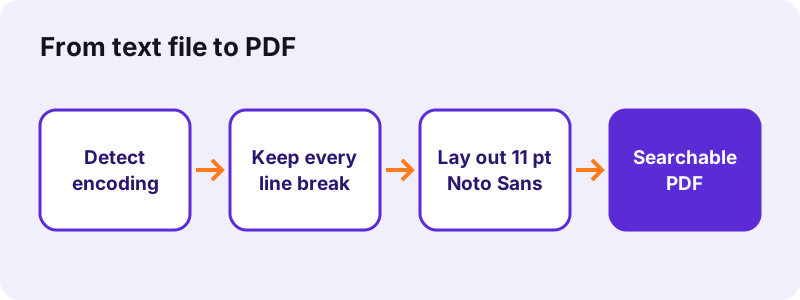
Plain text has no formatting, so the converter adds none: no headings are guessed and no lines are joined. What you see in Notepad is what you get on the page, except that long lines wrap at the right margin instead of running off the edge.
“In principle, plain text can be in any encoding, but today usually implies UTF-8.”
Encodings in pdf24 TXT to PDF
The reader tries UTF-8 first (with or without a byte-order mark), then UTF-16 when the file starts with a byte-order mark, and falls back to Windows-1252 for old Western European files. That covers files from Notepad, TextEdit, Linux editors and most programs.
pdf24 TXT to PDF with old accented files
A 1990s file saved in Windows-1252 is not valid UTF-8, so the reader detects that and decodes it as Windows-1252: é, ü and ñ come out right instead of as garbage characters.
pdf24 TXT to PDF and other code pages
Files in other legacy code pages, such as KOI8-R or Shift_JIS, are not detected. Open them in a text editor, save as UTF-8, and convert again.
pdf24 TXT to PDF tip for tabs
Tab characters become four spaces. If columns in your file were aligned with tabs, they may shift; replace tabs with spaces in your editor for exact control.
Does pdf24 TXT to PDF keep columns and ASCII tables aligned?
pdf24 TXT to PDF sets text in Noto Sans, a proportional font in which an i is narrower than an m, so columns lined up with spaces in a monospaced editor will not line up exactly in the PDF. Indentation at the start of a line is kept; alignment in the middle of a line can drift.
| Content of the .txt | In the PDF |
|---|---|
| Line breaks | Kept, every one |
| Blank lines | Paragraph gap |
| Leading spaces (indent) | Kept |
| Tabs | Four spaces |
| Form feed (\f) | New page |
| Long lines | Wrapped at the margin |
| Columns aligned with spaces | Can drift (proportional font) |
| Control characters | Removed |
For a log file or a code listing where alignment matters, Markdown to PDF with the text inside a code block gives a shaded, indented block; for exact monospaced layout, print from your code editor.
How fast is pdf24 TXT to PDF? Measured
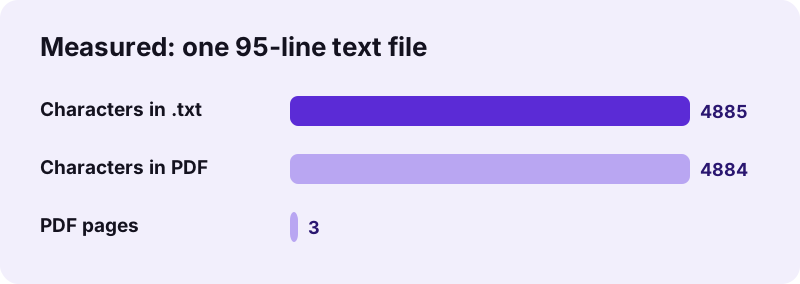
pdf24 TXT to PDF converted our 4.9 KB test file, 95 lines with French accents, a Russian sentence and an indented line, into a 3-page A4 PDF of 31,262 bytes in 1.3 seconds in Chrome on Windows 10. Of the 4,885 characters in the file, 4,884 could be extracted from the PDF.
| Measure | Value |
|---|---|
| Input | dc-notes.txt, 4.9 KB, 95 lines |
| Output | 3 pages, 31,262 B, A4 |
| Time (tool) | 1.3 s |
| Characters extractable | 4,884 of 4,885 |
| Uploaded | 0 bytes |
Is pdf24 TXT to PDF private?
pdf24 TXT to PDF never uploads the file: the browser reads it with the File API, JavaScript lays it out in memory, and the result line confirms 0 bytes uploaded. Notes, logs with internal host names, and drafts stay on your device, with no account and no copy on a server.
How local file reading works: File API on MDN.
pdf24 TXT to PDF for notes, logs, lyrics and e-mails
Plain text shows up in many forms. The converter treats them all the same way, so the result depends only on what is in the file, not on where it came from. The table lists common cases, what to expect in the PDF, and when another converter on the site fits better.
| File | Result |
|---|---|
| Phone or Notepad notes | Clean pages, line breaks kept |
| Server or app logs (.log) | Every line kept; long lines wrap |
| Song lyrics, poems | Stanzas kept by blank lines |
| E-mail saved as .txt | Headers and body as typed |
| CSV opened as text | Use Excel to PDF for a grid |
| Text with Markdown symbols | Use Markdown to PDF |
pdf24 TXT to PDF on iPhone, Android and Chromebook
The page runs in Safari, Chrome, Edge and Firefox, so a text file becomes a PDF on any phone, tablet or computer. Save the .txt to the device first, then pick it with Choose files.
- iPhone/iPad: pick the .txt from the Files app.
- Android: Download folder or Drive.
- Chromebook: Files app.
pdf24 TXT to PDF when you only have text to paste
No file? Paste the text into Create PDF, which makes a PDF from typed text with the same font and layout engine.
Fixing pdf24 TXT to PDF problems
Odd characters or a refused file usually point to the encoding or to a file that is not plain text. The checks below are quick to do in any text editor, such as Notepad on Windows, TextEdit on a Mac or gedit on Linux, before you convert the file again.
- Wrong letters in Cyrillic or Greek text: the file uses a code page such as Windows-1251 or KOI8-R; resave it as UTF-8.
- "No text was found": the file is empty or holds only spaces.
- Arabic, Hebrew or Chinese lines look right but are not selectable: these scripts are placed as images.
- Misaligned columns: see the proportional-font note above.
pdf24 TXT to PDF: frequently asked questions
Is pdf24 TXT to PDF free?
Yes. It is free, with no sign-up, no watermark and no limit, because your own device does the work. pdf24tools is an independent site and is not affiliated with PDF24 or Geek Software GmbH; we use the name only because it is what people search for. All tools on the site run in the browser.
Does pdf24 TXT to PDF upload my text file?
No. The browser reads the file from your disk and JavaScript lays it out in memory. The result line shows the bytes read and 0 bytes uploaded. Only the converter code is downloaded from our server; your text stays on your device.
Does pdf24 TXT to PDF keep line breaks?
Yes, every one. Each line of the file starts a new line in the PDF, blank lines become paragraph gaps, and lines longer than the page width wrap at the right margin instead of being cut. Leading spaces are kept, so indented lines stay indented.
Which encodings does pdf24 TXT to PDF understand?
UTF-8 with or without a byte-order mark, UTF-16 little- or big-endian with a byte-order mark, and Windows-1252 as the fallback for older Western files. That covers nearly all text from Windows, macOS, Linux, Android and iOS. Other code pages should be resaved as UTF-8 first.
Does pdf24 TXT to PDF use a monospaced font?
No. Text is set in Noto Sans, a proportional font, at 11 points. That reads well for notes and prose, but columns aligned with spaces can drift. For code or tables made of spaces, put the text in a Markdown code block and use Markdown to PDF.
Can pdf24 TXT to PDF convert log files?
Yes. Files ending in .log are accepted and converted like .txt: every line is kept and long lines wrap at the margin. A large log makes many pages, so cut it down to the relevant time range first; the PDF is searchable, which helps when sharing it.
Does pdf24 TXT to PDF keep Russian, Greek or accented text?
Yes. Latin, Greek and Cyrillic letters are drawn as real text with an embedded Noto Sans subset; our test file with French accents and a Russian sentence kept 4,884 of 4,885 characters. Arabic, Hebrew, Indic, Thai and CJK lines are drawn as images.
Can pdf24 TXT to PDF convert several text files at once?
Yes. Select or drop several files together; each becomes its own PDF with the same name, and the set downloads as one ZIP. To join them into one document, run the PDFs through Merge PDF afterwards, in the order you choose.
How do I start a new page in pdf24 TXT to PDF?
Put a form-feed character, the ASCII page-break code 12, at the start of a line; the converter starts a new page there. Most editors cannot type it directly, so the simpler way is to convert separate files and merge them, each file starting on a fresh page.
What page size does pdf24 TXT to PDF use?
A4 by default, 595 × 842 points with 56-point margins, or Letter, 612 × 792 points, if you choose it before converting. Text is 11-point Noto Sans. Our 95-line test file filled 3 A4 pages. A .txt file stores no page size of its own, so the size you pick here is always the one used.
Is the PDF from pdf24 TXT to PDF searchable?
Yes. Every line is drawn as real text, so Ctrl+F, copy and paste and screen readers work in any PDF viewer. That is the main difference from printing a screenshot of the text, which would need OCR before anyone could search it.
pdf24 TXT to PDF: sources
- Plain text — Wikipedia
- Text file — Wikipedia
- File API — MDN Web Docs