How to use pdf24 PDF to TXT in 4 steps
- Choose the PDF. Tap Choose a file or drop one PDF on the box; it is read on your device.
- Pick the text layout. Paragraphs (reflowed) joins lines into paragraphs; Keep the page layout keeps columns aligned with spaces.
- Press Convert to TXT. Text PDFs finish in under a second. Leave Mark where each page starts on to get page markers.
- Save the .txt. Download the file and open it in any text editor, or import it where you need the words.
What does pdf24 PDF to TXT save, exactly?
pdf24 PDF to TXT saves the characters of the PDF's text layer, in reading order, as a UTF-8 text file with Windows line endings. Formatting such as bold, fonts and pictures is dropped on purpose: the result is just words, so it opens in every editor and imports cleanly into other software.
“A text file is a kind of computer file that is structured as a sequence of lines of electronic text.”
The file starts with a UTF-8 byte order mark, which tells Notepad and Excel to read it as UTF-8, so accents, Arabic, Cyrillic and Chinese letters display correctly instead of turning into garbled symbols. Lines end with CR LF, the Windows convention that macOS and Linux editors also read without trouble.
pdf24 PDF to TXT in reflowed mode
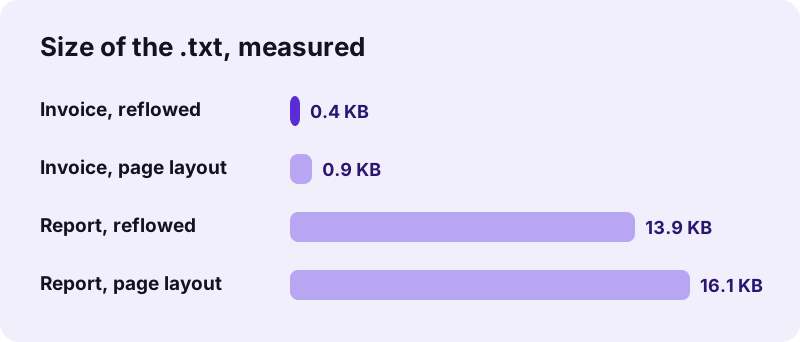
Paragraphs (reflowed) is the default. Lines that belong together are joined into one long line per paragraph, a hyphen at a line break is removed when the word continues, and paragraphs are separated by an empty line. Our 6-page report gave a 13.9 KB file with 1,968 words.
pdf24 PDF to TXT with tables
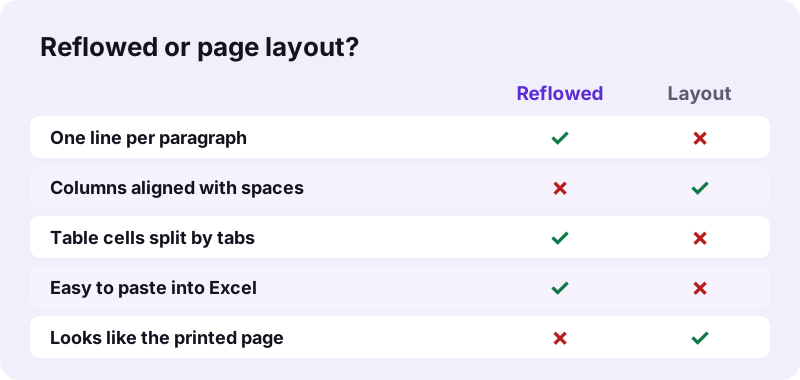
In reflowed mode, column-aligned rows are written with a TAB between cells. Our invoice row Laptop stand, 2, 25.50, 51.00 came out as four tab-separated values, so you can paste the lines straight into a spreadsheet and each value lands in its own cell.
pdf24 PDF to TXT with the page layout kept
Keep the page layout places every piece of text at the character column its position on the page suggests, padding with spaces. Columns, indents and right-aligned totals stay visually aligned in a monospaced font. The invoice grew from 425 bytes to 905 bytes because of the padding spaces.
pdf24 PDF to TXT tip for two-column articles
For a two-column journal page, reflowed mode keeps each sentence whole and is better for reading or quoting; layout mode puts both columns side by side on each line, which is useful only for checking where text sat on the page.
Reflowed or Keep the page layout: which pdf24 PDF to TXT mode fits?
Reflowed .txt output fits most uses: reading, quoting, translating, feeding text to a search index or a chatbot, and pasting tables into Excel through the tabs. Keep the page layout fits forms, statements and price lists whose meaning depends on columns, and anything you want to compare line by line with the printed page.
| Test PDF | Mode | .txt size | Time | Words |
|---|---|---|---|---|
| Report, 6 pages, 5.1 KB | Reflowed | 13.9 KB | 0.4 s | 1,968 |
| Report, 6 pages | Page layout | 16.1 KB | 0.3 s | 1,968 |
| Invoice, 2 pages, 2.4 KB | Reflowed | 425 B | 0.5 s | 74 |
| Invoice, 2 pages | Page layout | 905 B | 0.5 s | 74 |
What are the page markers in pdf24 PDF to TXT?
Page markers are the lines --- Page 1 ---, --- Page 2 --- and so on that pdf24 PDF to TXT writes at the start of each PDF page when Mark where each page starts is ticked, which is the default. They let you find a passage by page number. Untick the option for one continuous text without markers.
- Keep markers for citations, legal files and anything checked against the PDF.
- Remove them for text that will be re-used as one block, such as a translation or a website article.
- Search for --- Page in your editor to jump between pages quickly.
Why is the .txt empty after pdf24 PDF to TXT?
An empty .txt means the PDF is a scan or a photo of pages, with pictures of letters but no text layer. pdf24 PDF to TXT cannot read pictures, so our 4-page scan gave a 73-byte file holding only the four page markers, and the result line warned that 4 pages had no selectable text.
Run OCR PDF first: it recognises the letters and adds a text layer, then convert the OCR result here. To check a PDF before converting, try to select a word in any PDF viewer; if nothing highlights, it is a scan. Strange symbols instead of letters mean the PDF's fonts lack a character map, which OCR also fixes.
Is pdf24 PDF to TXT safe for private PDFs?
pdf24 PDF to TXT is safe for private PDFs because the file never leaves your device. The browser reads it with the File API and JavaScript writes the .txt in memory. In our tests the network log showed 0 upload requests, and the result line confirms 0 bytes uploaded.
No account and no server copy, so bank statements, contracts and medical letters stay with you. Read how local file access works in the File API on MDN.
pdf24 PDF to TXT or another export?
A plain .txt file is the right export when you only need the words. If you need headings and tables to stay structured, Markdown keeps them as # headings and pipe tables; if you need bold, sizes and real tables in an editor, convert to Word or Rich Text instead. To skip the file, copy the text straight from the page.
| You need | Tool |
|---|---|
| Words only, any program | PDF to TXT (this page) |
| Headings and tables as Markdown | PDF to Markdown |
| Editable Word document | PDF to Word |
| Formatted text for old editors | PDF to RTF |
| Copy text to the clipboard | Copy from PDF |
pdf24 PDF to TXT on phones and computers
pdf24 PDF to TXT works in Chrome, Edge, Firefox and Safari on Windows, macOS, Linux, Android and iOS, with nothing to install. The .txt opens in Notepad, TextEdit, any code editor, the Files preview on iPhone and most Android file managers.
To turn edited text back into a document, use TXT to PDF, which also runs on your device.
pdf24 PDF to TXT: frequently asked questions
Is pdf24 PDF to TXT free?
Yes. It is free, with no sign-up, no watermark and no limit on files. The extraction runs on your own device, so there is no server cost per file. Convert a PDF, save the .txt, then pick the next one; each file is yours to keep, edit and share.
Which encoding does pdf24 PDF to TXT use?
UTF-8 with a byte order mark, and Windows CR LF line endings. UTF-8 holds every script, from accented Latin letters to Arabic, Chinese and emoji, and the byte order mark makes Notepad and Excel recognise it automatically. Linux and macOS editors read the file without any settings.
Does pdf24 PDF to TXT keep tables?
It keeps the values and their order. In reflowed mode each row becomes one line with cells separated by tabs, ready to paste into a spreadsheet. In page layout mode the cells are aligned with spaces so they look like the printed table. For a real spreadsheet file, use PDF to Excel instead.
Can pdf24 PDF to TXT read a scanned PDF?
No, not on its own. A scan is a picture of a page, so there is no text to extract; our 4-page scan produced only page markers. Run OCR PDF first to recognise the letters, then convert the result here to get the words as plain text.
Does pdf24 PDF to TXT upload my file?
No. The PDF is read and processed in your browser. We logged every request during our tests: 0 uploads, and the result line shows 0 bytes uploaded. You can confirm this in the Network tab of your browser's developer tools while you convert a file.
Is this pdf24 PDF to TXT tool made by PDF24?
No. pdf24tools is an independent website, not affiliated with PDF24 or Geek Software GmbH. The converter is our own code: it runs in your browser, uploads nothing and needs no account. We use simple page names so the tool is easy to find, but the site, code and team are separate.
How do I remove the page markers from pdf24 PDF to TXT?
Untick Mark where each page starts before you press Convert to TXT. The text then runs from the first page to the last without --- Page N --- lines. If you already have a file with markers, delete them with Find and Replace in your editor by searching for --- Page.
Why are words joined or split oddly after pdf24 PDF to TXT?
Some PDFs place each letter or word separately with unusual spacing, so the gaps between pieces are guessed from their positions. Most text comes out cleanly, but a few PDFs give extra or missing spaces. Use Find and Replace on double spaces, or try Keep the page layout for spacing-heavy files.
Can pdf24 PDF to TXT handle Arabic or Chinese PDFs?
Yes, for PDFs with a real text layer. The file is UTF-8, so every script is stored correctly, and right-to-left lines are written in reading order. Open the file in an editor with a suitable font. Scanned pages in any script still need OCR first.
Can I use pdf24 PDF to TXT on an iPhone?
Yes. Open the page in Safari, tap Choose a file, pick the PDF from Files and tap Convert to TXT. The .txt is saved to Files → Downloads, where the Files preview, Notes or any text app opens it. Nothing is installed and the PDF stays on the phone.
Is there a size limit in pdf24 PDF to TXT?
There is no fixed limit; your device's memory sets it, because the whole PDF is read into the browser. Text PDFs are light and fast: our 6-page report took 0.4 seconds. Large scans are slow and give no text anyway, so run OCR on them first.
Can pdf24 PDF to TXT prepare a PDF for ChatGPT or a translator?
Yes. Reflowed mode gives clean paragraphs without line breaks in the middle of sentences, which suits translation tools, chatbots and search indexes. Untick the page markers if you want one continuous text. For structure such as headings and tables, PDF to Markdown keeps more of the layout.
pdf24 PDF to TXT: sources
- Text file — Wikipedia
- Plain text — Wikipedia
- File API — MDN Web Docs