What makes a good pdf24 alternative?
A good alternative covers the tasks you do most, keeps your files private and does not hide limits behind a paywall. Check four things: where the file is processed, whether an account is required, whether results carry a watermark, and whether the tools you need, such as compression to an exact size, are really there.
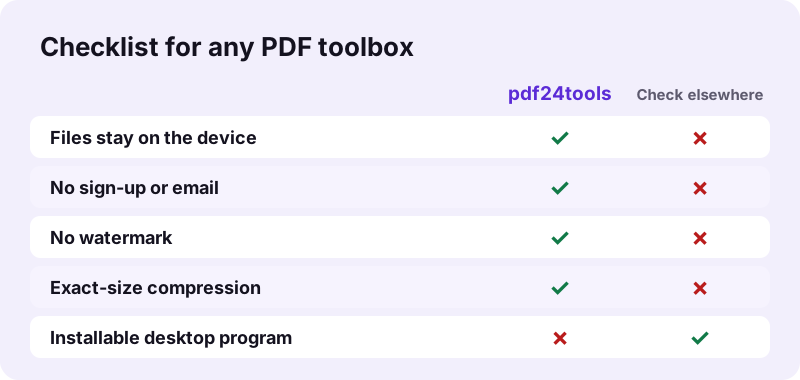
- Processing: on your device, or uploaded to a server?
- Account: needed for basic tasks, or not at all?
- Watermark and limits: any stamp, page cap or daily quota?
- Coverage: merge, split, compress, convert, edit, sign, OCR, redact.
- Honesty: does the tool say what it cannot do?
Use the five points as a score sheet. A pdf24 alternative that fails the first point, by uploading files, needs a clear deletion policy you can trust; one that fails the third, with a watermark, is not really free for documents you send to others.
pdf24 alternative: privacy first
The biggest difference between options is where your file goes. A browser-only pdf24 alternative opens the file with the File API and never sends it. You can verify that in two minutes with the Network tab of your browser's developer tools: look for a POST request the size of your file.
pdf24 alternative: coverage of tools
pdf24tools offers more than 100 tool pages, from Merge and Split to PDF to Excel, OCR in 11 languages, Redact and Repair. A few server-only jobs are missing on purpose, such as converting a web page to PDF or validating PDF/A.
pdf24 alternative: speed on your device
Local processing is fast for most jobs: 0.2 seconds for a 15-page merge and 0.8 seconds for PDF to Word in our tests. Heavy work takes longer because your device does it, such as 82.2 seconds for OCR on a 4-page scan.
pdf24 alternative: tip for testing
Test any option with a file you know well, such as a scanned contract, and compare size, readability and time. One honest test tells you more than a feature list.
How does pdf24tools perform as a pdf24 alternative?
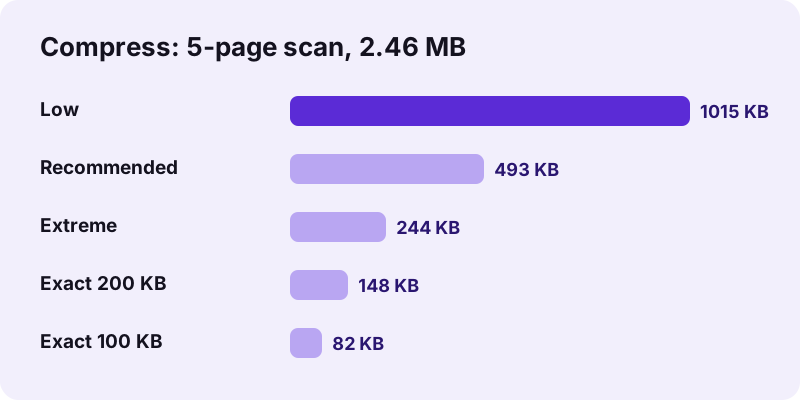
As an alternative, pdf24tools handled every core task in the browser with no upload in our tests on 2 November 2026. Merging three PDFs took 0.2 seconds, compression cut a 2.46 MB scan by 80 %, PDF to Excel kept real numbers, and Redact PDF left 0 extractable characters on redacted pages.
| Task | Tool | Measured result |
|---|---|---|
| Merge | Merge PDF | 3 files, 15 pages in 0.2 s |
| Compress | Compress PDF | 2.46 MB scan to 493 KB (−80 %) |
| To Word | PDF to Word | invoice table became a real Word table |
| To Excel | PDF to Excel | 26 cells, numbers stored as numbers |
| OCR | OCR PDF | 2,575 words on 5 pages, 75.1 s |
| Redact | Redact PDF | 240 matches removed, 0 characters left |
| Edit | Edit PDF | text, images, shapes, white-out added in 0.1 s |
Each result was checked after download with a PDF library: the merged file had all 15 pages, the Excel sheet held 25.5 and 319.7 as numbers, and the OCR copy returned searchable text. That is the level of checking we suggest for any pdf24 alternative you consider.
When is a desktop program the better pdf24 alternative?
A desktop program is the better choice when you need features a browser cannot provide: a virtual PDF printer, certificate-based digital signatures, PDF/A validation, sending faxes, or batch jobs on thousands of files overnight. For these, the program that comes with your system, or dedicated software, is the right alternative to a web tool.
- Print to PDF: built into Windows and macOS print dialogs.
- Viewing and quick annotation on a Mac: the Preview app that ships with macOS.
- Certificate signatures: software that holds your digital ID.
- Archiving to PDF/A: a tool with a validator.
“Preview is the built-in image and PDF viewer of the iOS, iPadOS & macOS operating system.”
In practice many people combine both: the system print dialog to make a PDF, and a browser pdf24 alternative for merging, compressing, converting and redacting it. Neither needs an install beyond what your computer already has.
Is a browser pdf24 alternative safe for work files?
A browser-only alternative is safe for work files because the document never leaves the computer that opened it. In our logs every run showed 0 POST requests and 0 bytes uploaded. The remaining questions are your company's policy on web tools and where you store the downloaded result afterwards.
Before you adopt any pdf24 alternative at work, run the Network-tab test on one non-confidential file and keep a screenshot for your IT team. The File API on MDN describes how pages read local files without sending them.
A browser pdf24 alternative also needs no admin rights, which matters on locked-down work laptops where installing software requires a ticket to IT.
Write down what you tested, the date and the result, so the decision can be repeated when the team or the tools change.
What are the honest limits of this pdf24 alternative?
Every alternative has limits, and here they come from running in the browser and are stated in each result line. Compression and redaction turn affected pages into pictures, Edit PDF adds content instead of rewriting text, Word to PDF uses Noto Sans, and Sign PDF places a visible image, not a certificate.
| Tool | Limit |
|---|---|
| Compress PDF | Scanned pages are redrawn as JPEG |
| Edit PDF | White-out hides text, it stays in the file |
| Word to PDF | Noto Sans fonts; headers, footers, footnotes left out |
| PDF to Word | Scans become pictures until you run OCR |
| Sign PDF | Visible signature, not a digital certificate |
If one of these limits blocks your task, that is the moment to combine a pdf24 alternative in the browser with a desktop program for that single step.
How do you switch to a pdf24 alternative in 2 minutes?
Switching to a browser alternative takes no setup: open the tool you used most, run one familiar file through it and compare the result. There is no account to create and nothing to install. Bookmark the tools you use, since the site keeps no history, and keep your originals, which are never changed.
- Pick your most common task, for example Compress PDF.
- Run a file you know and compare size and readability.
- Try the next task: merge, split or convert.
- Bookmark the pages you keep using.
Start with a document you are not worried about, so you can judge the pdf24 alternative on quality and speed alone before using it for sensitive files.
pdf24 alternative: frequently asked questions
What is the best pdf24 alternative online?
The best pdf24 alternative is the one that does your tasks without uploading your files or adding limits. pdf24tools runs more than 100 tools in the browser, with no sign-up and no watermark. Test it, or any other option, with a file you know and check the Network tab for uploads.
Is there a free pdf24 alternative?
Yes. Every tool on pdf24tools is a free pdf24 alternative, with no paid tier, no daily quota and no watermark. The processing happens on your device, which is why there is no per-file cost to charge for. Our test files of up to 10.80 MB went through without any limit.
Is there a pdf24 alternative without upload?
Yes. pdf24tools processes files inside your browser with JavaScript and WebAssembly. Our request logs showed 0 POST requests in every test, and each result line states 0 bytes uploaded. OCR downloads its engine data from a public CDN, but your scan is never sent.
Is there a pdf24 alternative for Mac?
Yes, two kinds. The Preview app that comes with macOS opens PDFs and handles simple annotation. For merging, compressing to an exact size, OCR or PDF to Excel, pdf24tools works in Safari or Chrome on any Mac with nothing to install.
Is there a pdf24 alternative for Linux?
Yes. pdf24tools runs in Firefox or Chrome on any Linux distribution, such as Ubuntu, without packages or dependencies. Every tool, from Merge to OCR, works the same as on Windows, because the processing happens in the browser rather than in a native program.
Does a pdf24 alternative need an account?
Not here. No tool asks for an email, a login or a card. You open a page and use it. Without an account there is no file history on our side, so keep the results you download in a folder of your choice.
Which pdf24 alternative can compress to an exact size?
pdf24tools has an Exact size option in Compress PDF. You type a limit such as 100 KB and the tool steps down image quality until the file fits. Our 2.46 MB scan reached 82 KB with a 100 KB target and 148 KB with a 200 KB target.
Is there a pdf24 alternative that edits existing text?
Edit PDF on pdf24tools adds text, images, shapes and white-out, but it does not rewrite the original text. To change wording, cover it with white-out and type over it, or convert to Word with PDF to Word, edit there and convert back with Word to PDF.
Is pdf24 alternative software safer than a website?
Not automatically. Installed software can read any file on your computer, while a web page can only read the files you pick. A pdf24 alternative in the browser that never uploads is often the more private choice. Software is safer only when you need features like certificate signing.
Is this pdf24 alternative an official tool?
No. pdf24tools is an independent website and is not affiliated with PDF24 or Geek Software GmbH. Our tools are separate code that runs in your browser. Everything in this guide describes our own tools and our own measurements from 2 November 2026.
Does a pdf24 alternative work on a phone?
Yes. pdf24tools works in Safari, Chrome and other browsers on iPhone and Android, with no app to install. Pick the file from Files or Downloads and the result goes to your downloads. Heavy jobs such as OCR take longer on a phone than on a laptop.
Can a pdf24 alternative convert PDF to Excel?
Yes. PDF to Excel on pdf24tools turns text tables into spreadsheet cells. Our 2-page invoice became 26 cells in 0.6 seconds, with numbers stored as real numbers such as 319.7. Scanned PDFs need OCR PDF first, because they contain no text layer.
What can a browser pdf24 alternative not do?
A browser tool cannot act as a virtual printer, send faxes, create certificate-based digital signatures or validate PDF/A, and it does not convert web pages to PDF. For those jobs use the print dialog of your system or dedicated desktop software.
More pdf24 alternative tools and guides
pdf24 alternative: sources
- Preview (Apple) — Wikipedia
- File API — MDN Web Docs
- PDF — Wikipedia