How do you pdf24 edit text in an existing PDF?
To edit text in an existing PDF, open Edit PDF, cover the old words with the White-out tool, then choose Text, click on the same spot and type the new words. Pick a size and colour that match, press the save button and download. Our invoice edit took 0.1 seconds.
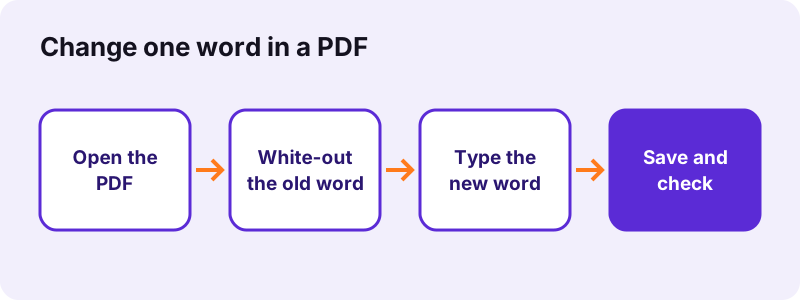
- Open Edit PDF and choose the file; the pages appear as a preview you can click on.
- Select White-out and drag a box over the word or line you want to replace.
- Select Text, click inside the white box and type the new words.
- Set the size and colour in the toolbar so the new text matches the page.
- Press the button under the preview, download the -edited.pdf file and read it once in a PDF viewer.
pdf24 edit text: what the tool really changes
The editor adds new objects on top of the page: text boxes, pictures, freehand ink, highlights, white rectangles and shapes. It does not rewrite the letters that are already stored in the PDF. That is why the pdf24 edit text method for an existing word is always two parts: hide the old word, then type a new one over it.
pdf24 edit text with matching size and colour
Text is sized in PDF points, so 11 or 12 points matches most letters and invoices. Choose black, blue or red from the colour list. The new text uses the editor's own font, so a word in a decorative typeface will look slightly different from its neighbours; place it on its own line when that matters.
pdf24 edit text in Arabic, Hebrew or Chinese
Lines in complex scripts such as Arabic, Hebrew, Hindi, Thai or Chinese are shaped by the browser and placed on the page as an image, so they display correctly. Latin text stays real text. Both kinds print sharply at normal sizes.
pdf24 edit text: tip for long changes
If more than a few lines must change, it is faster to convert the file with PDF to Word, edit the paragraphs there, and convert back with Word to PDF. White-out is best for a date, a name or a number.
Does pdf24 edit text remove the old words from the file?
No. White-out only covers the old words with a white box; the original text is still stored inside the PDF and can be copied or found by search. In our test pypdf still extracted the client name from under the box. To delete words for good, use Redact PDF instead of white-out.
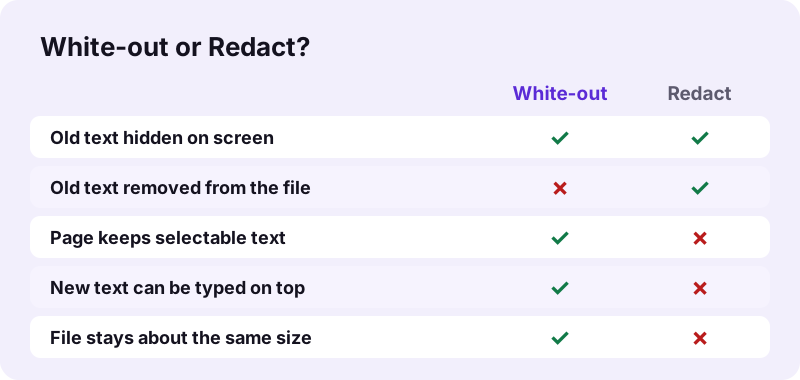
The tool says this itself after saving: "white-out only covers text; it is still inside the file." For a typo or an updated date that is fine. For a bank account, a salary or a name that must not be seen, run Redact PDF, which redraws the affected pages as pictures with the boxes burnt in.
What did our pdf24 edit text test measure?
Our edit text test used a 2-page invoice of 2.4 KB. A white-out box and a new invoice number were saved in 0.1 seconds, the output was 2.1 KB, the second page kept its 68 characters of text, and the request log showed 0 uploads. Redacting the same name instead produced 93 KB.
| Action | Input | Output | Old text still extractable? |
|---|---|---|---|
| White-out + new text | invoice-v1.pdf, 2.4 KB | 2.1 KB in 0.1 s | Yes |
| Redact the client name | invoice-v1.pdf, 2.4 KB | 93 KB in 0.2 s | No |
| Redact a word on all 6 pages | text-6p.pdf, 5.1 KB | 2.61 MB in 1.1 s | No, 0 characters left |
The size jump for redaction comes from turning each affected page into a picture. A white-out edit keeps the page as text, which is why the pdf24 edit text route stays small.
pdf24 edit text versus converting to Word
Editing on the page keeps the layout exactly as it was, but each change is a separate box. Converting to Word lets you rewrite whole paragraphs, but the layout is rebuilt from the text, so columns and text boxes become normal paragraphs. Choose by how much text changes.
| Need | Best route | Why |
|---|---|---|
| Fix a date, name or number | Edit PDF: white-out + text | Layout untouched, done in seconds |
| Rewrite several paragraphs | PDF to Word, then Word to PDF | Real paragraphs that reflow |
| Fill a form | Fill out PDF | Uses the form's own fields |
| Add a note or arrow | Edit PDF: text, shape, draw | No conversion needed |
Why can pdf24 edit text not select the words in a scan?
A scanned page is one picture, so there are no separate words to select or edit. You can still white-out an area and type over it, because the editor works on any page. To make the words searchable first, run OCR PDF, which recognises the text and adds a hidden text layer.
“Optical character recognition (OCR) or optical character reader is the electronic or mechanical conversion of images of typed, handwritten or printed text into machine-encoded text”
In our OCR test a 5-page contract scan gave 2,575 recognised words in 75 seconds. After that, OCR PDF output can be searched, and the pdf24 edit text steps work the same way on top of it.
pdf24 edit text on iPhone, Android and computers
The editor is a web page, so it runs in Safari, Chrome, Edge and Firefox on phones, tablets and computers. On a phone, tap instead of click and drag with one finger to draw the white-out box. The PDF is processed on the device, so a mobile connection only loads the page.
- iPhone / iPad: choose the PDF from the Files app; the result lands in Downloads.
- Android: pick from Files or Downloads; zoom the page before you pdf24 edit text in small print.
- Windows, Mac, Linux: drag the file onto the box; keyboard shortcuts work inside text boxes.
Is pdf24 edit text safe for contracts and invoices?
Editing text this way is private because the PDF never leaves your device: the browser opens it with the File API and saves the edited copy locally. Our request log showed no POST request and the result line said 0 bytes uploaded. Remember that white-out does not delete the hidden words.
Changing a signed contract or an issued invoice can have legal consequences, so keep the original and note what you changed with pdf24 edit text. For how browsers read local files, see the File API on MDN.
pdf24 edit text: frequently asked questions
Is pdf24 edit text free?
Yes. The pdf24 edit text steps on pdf24tools cost nothing: there is no account, no watermark and no limit on the number of files or edits. The editor runs inside your browser on your own device, so there is no server cost to pass on, and you can repeat an edit as often as needed.
Can pdf24 edit text change the font of existing words?
No. The editor cannot change letters that are already in the PDF, so their font, size and spacing stay as they are. You can cover a word with white-out and type a replacement in the editor's font, at the size and colour you choose. For full restyling, convert the file to Word.
Does pdf24 edit text keep the rest of the page selectable?
Yes. White-out and new text are added on top of the page, and everything else stays exactly as it was, including selectable and searchable text. In our test the untouched second page of the invoice kept its 68 characters. Only Redact PDF turns pages into pictures.
How do I delete a word for good with pdf24 edit text?
You cannot with white-out alone, because the hidden word stays inside the file. Use Redact PDF: draw a box or type the word in the search field and press Mark all. The affected pages are redrawn as pictures with black boxes burnt in, and the old text is gone.
Can pdf24 edit text add a new paragraph?
Yes, as a text box. Choose Text, click where the paragraph should start and type; press Enter for new lines. With pdf24 edit text the new lines do not push existing lines down, because the page layout is fixed. For a paragraph that must reflow, use PDF to Word and edit there.
Does pdf24 edit text work on a password-protected PDF?
Not while it is locked. If the PDF needs a password to open, remove the password first with Unlock PDF, using the password you know, and then edit the unlocked copy. Files that only restrict editing can be unlocked without a password, as our test with a permissions-only file showed.
Why does my new text look different after pdf24 edit text?
The new words use the editor's font, not the font embedded in your PDF, which may be a licensed typeface the browser cannot reuse. Match the size in points and the colour, and keep the replacement on its own line or field, so the difference is hard to notice in print.
Can pdf24 edit text add images or a logo?
Yes. Next to Text, the toolbar has Image, Draw, Highlight, White-out and Shape. Image places a PNG, JPEG or WebP picture that you can move and resize with the corner handle, for example a logo, a stamp or a photo, on any page of the document.
Is my file uploaded when I use pdf24 edit text?
No. The PDF is opened by your browser and every change is drawn and saved in JavaScript on your device. Our request log for the test showed no POST request, and the result line states 0 bytes uploaded, so contracts and invoices stay on your phone or computer.
Can I undo a change made with pdf24 edit text?
Before saving, yes: click an added item and press its small cross to remove it, or drag it to a new place. After saving, the original file is unchanged on your device, so you can open it again and redo the edit. Keep the original until you have checked the result.
Does pdf24 edit text work on scanned PDFs?
Partly. A scan has no separate words, so nothing can be selected, but white-out and new text can still be placed on the picture. If you want search and copy as well, run OCR PDF first; in our test it recognised 457 words on a 4-page scan.
Is pdf24 edit text an official tool?
No. pdf24tools is an independent website and is not affiliated with PDF24 or Geek Software GmbH. The editor here is our own code that runs in your browser. The test results in this guide are our own measurements from 2 November 2026.
How large can a PDF be for pdf24 edit text?
There is no fixed size limit, because the file is never uploaded. The limit is the memory of your device: a phone handles typical letters and invoices easily, while documents with hundreds of image-heavy pages load faster on a computer. Split very large files first and edit only the part you need.
More pdf24 edit text tools and guides
pdf24 edit text: sources
- Optical character recognition — Wikipedia
- File API — MDN Web Docs
- Redaction — Wikipedia