How do you pdf24 sign PDF iPhone documents step by step?
To sign a PDF on iPhone, open Sign PDF in Safari, tap the button to choose the file in the Files app, draw or type your signature, tap Use this signature, then tap the page where it belongs. Press the sign button and save the -signed.pdf file to Downloads.
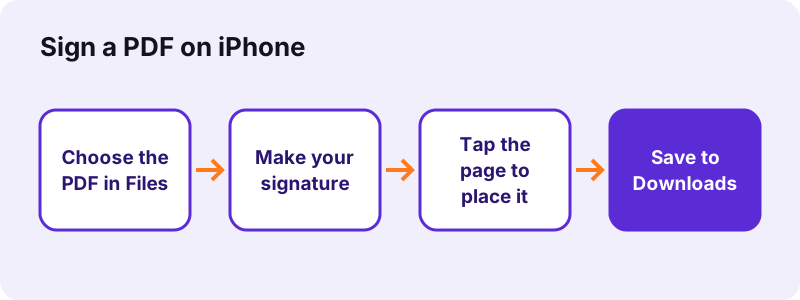
- Open Sign PDF in Safari or Chrome on the iPhone.
- Tap Choose a file and pick the document from Files, iCloud Drive or Downloads.
- In the signature box choose Draw, Type or Upload, pick black, blue or red, and tap Use this signature.
- Tap the spot on the page; drag the signature to move it and pull its corner to resize it.
- Add the Date or Initials if the form asks, then press the button under the pages and save the file.
pdf24 sign PDF iPhone: drawing with a finger
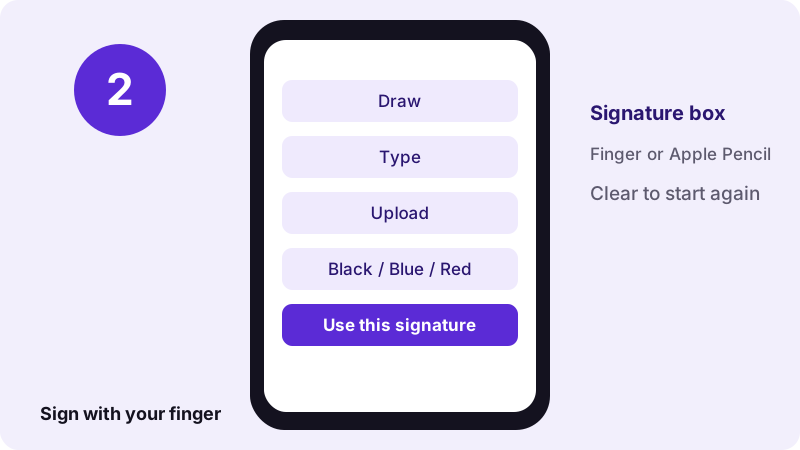
The Draw tab gives a wide box that follows your finger or an Apple Pencil on iPad. Turn the phone sideways for more room. If the line looks shaky, tap Clear and sign again more slowly; the signature is trimmed to its ink, so the empty space around it does not matter.
pdf24 sign PDF iPhone with a typed name
The Type tab turns your name into a handwriting-style signature in a choice of script fonts, up to 60 characters. It is the quickest option on a small screen and looks the same every time, which helps when you sign several pages of one contract.
pdf24 sign PDF iPhone with a photo of your signature
Sign a white sheet with a dark pen, take a photo, and use the Upload tab with a PNG, JPEG or WebP picture. Leave Remove white background ticked so only the ink lands on the page, not a grey rectangle of paper.
pdf24 sign PDF iPhone: tip for multi-page contracts
After the first signature, the Add signature button reuses it, so you can tap each page that needs it. Use Initials for the bottom of every page; they are placed at about 10 % of the page width, the full signature at 24 %.
What did our pdf24 sign PDF iPhone test measure?
Our sign PDF test placed a typed signature on page 1 of a one-page form. The input was 12 KB, the signed file was 29 KB, saving took 0.2 seconds and the request log showed 0 uploads. We measured in Chrome on Windows; on an iPhone the same page runs the same code.
| Step | Result |
|---|---|
| Input file | form.pdf, 1 page, 12 KB |
| Signature | Typed: "Alex Morgan", black |
| Output | form-signed.pdf, 29 KB |
| Time to save | 0.2 s |
| Bytes uploaded | 0 |
The file grows by a few kilobytes because the signature is stored as a transparent PNG image on the page. A drawn signature with long strokes can be a little larger than a typed one, but a pdf24 sign PDF iPhone result stays well below the usual email limits.
Is a signature from pdf24 sign PDF iPhone legally valid?
A signature made here is a simple electronic signature: an image of your handwriting placed on the page. Many everyday forms, rental papers and permission slips accept that. Contracts that require a qualified or certificate-based digital signature need a signing service with identity checks, which this tool does not provide.
“An electronic signature, or e-signature, is data that is logically associated with other data”
The tool says so after saving: "this is a visible signature, not a certificate-based digital signature." When in doubt, ask the person who sent the document which kind they need. Our digital signature guide explains the difference.
pdf24 sign PDF iPhone versus printing and scanning
Signing on the phone skips the printer, the pen and the scanner. You get a clean PDF with selectable text, while a printed and scanned copy becomes a picture of paper that is larger and harder to search. Both are visible signatures; neither adds a cryptographic certificate to the file.
| Sign on iPhone | Print, sign, scan | |
|---|---|---|
| Equipment | Phone only | Printer + scanner or camera |
| Text stays selectable | Yes | No, page becomes a picture |
| Time | About a minute | Several minutes |
| Certificate signature | No | No |
For most landlords, schools and HR departments the pdf24 sign PDF iPhone route is enough, because they ask for a signed copy, not a certificate. If a bank or court asks for a qualified signature, the visible image will not replace it, however neat it looks.
pdf24 sign PDF iPhone: where the signed file is saved
Safari saves the signed PDF to the Downloads folder in the Files app, unless you chose another download location in Settings. Open Files, tap Browse, then Downloads. From there you can share the file by Mail or Messages, move it to iCloud Drive or open it in another app.
- Mail: tap Share on the file and choose Mail; the PDF is attached as it is.
- Upload portal: in Safari, the portal's Choose File button opens Files, where the signed copy is in Downloads.
- Too large to send? Run Compress PDF on the signed copy.
If you changed Safari's download location to iCloud Drive, the signed file appears there instead and syncs to your other Apple devices. You can then open the same pdf24 sign PDF iPhone result on a Mac to print it or attach it to an email from the desktop.
Is it safe to pdf24 sign PDF iPhone documents in Safari?
Signing in Safari here is private because the PDF and your signature never leave the phone. The page opens the file with the browser File API and writes the signed copy on the device; our request log showed no POST request. Your signature is not stored after you close the tab.
That matters for leases, medical forms and job contracts. Keep the unsigned original until the other side confirms receipt. For how browsers read local files, see the File API on MDN.
What can you do when pdf24 sign PDF iPhone does not work?
When signing fails on an iPhone, check three things: the PDF is not password-protected, the signature was confirmed with Use this signature, and you tapped the page afterwards. Pressing the sign button with nothing placed shows the message that nothing has been added yet, which is the most common cause.
- Locked file: remove the password with Unlock PDF, then sign the copy.
- Form fields: type answers with Fill out PDF before signing.
- Very large scans: close other tabs so Safari has enough memory to draw the pages.
- Wrong spot: tap the cross on the signature and place it again; nothing is written to the file until you press the sign button.
pdf24 sign PDF iphone: frequently asked questions
Is pdf24 sign PDF iPhone free?
Yes. Signing a PDF on pdf24tools costs nothing on any device: no account, no watermark and no limit on documents or signatures. The pdf24 sign PDF iPhone steps run inside Safari on your own phone, so there is no server cost to charge for and nothing to subscribe to.
Do I need an app for pdf24 sign PDF iPhone?
No. Sign PDF is a web page, so Safari or Chrome is enough for the pdf24 sign PDF iPhone steps. There is nothing to install from the App Store and no account to create. Open the page, choose the file from Files, sign and save; the signed copy appears in the Downloads folder.
Can pdf24 sign PDF iPhone add the date next to my signature?
Yes. Tap Date in the toolbar and then tap the page: a text box with today's date in your phone's date format appears, which you can move or edit. The Text button adds any other words, for example your printed name or the place of signing.
Does pdf24 sign PDF iPhone work on iPad?
Yes. The page works in Safari on iPad the same way, and the bigger screen makes placing signatures easier. With an Apple Pencil, the Draw tab follows the pencil, so the signature looks closer to one made on paper. The file is saved to Downloads in Files.
Can I sign several pages with pdf24 sign PDF iPhone?
Yes. After the first signature is made, the Add signature button reuses it, so you can tap every page that needs it. Use the Initials button for a smaller mark at the foot of each page, which many contracts ask for, and the full signature on the last page.
Is pdf24 sign PDF iPhone a digital signature?
No. The tool places a visible image of your signature on the page, which is a simple electronic signature. It does not add a certificate or cryptographic seal, so a viewer will not show a verified signer. Use a certificate signing service when a contract explicitly requires that.
Is my signature uploaded by pdf24 sign PDF iPhone?
No. The signature is drawn, typed or loaded inside Safari and placed on the PDF on your phone. Our request log showed no POST request during signing, and the result line states 0 bytes uploaded. Nothing is kept after you close the tab, so you make the signature again next time.
Why is the background grey after pdf24 sign PDF iPhone?
You probably uploaded a photo with the Remove white background box unticked, so the paper around the ink came along. Upload the photo again with the box ticked, or use better light when taking the picture. Drawn and typed signatures always have a transparent background.
Can pdf24 sign PDF iPhone sign a password-protected PDF?
Not while it is locked. A PDF that needs a password to open must be unlocked first with Unlock PDF, using the password you were given. Sign the unlocked copy, and protect it again with Lock PDF if the recipient expects a protected file.
How do I move or resize a signature in pdf24 sign PDF iPhone?
Drag the signature with one finger to move it, and pull the small handle at its corner to make it bigger or smaller. Tap the cross on it to remove it. Zoom the page with two fingers first when you need to hit a narrow signature line exactly.
Does pdf24 sign PDF iPhone change the rest of the document?
No. Only the signature, initials, date and text you add are written onto the pages. The rest of the PDF, including its text, pictures and page size, stays as it was, and the text remains selectable. The original file on your phone is not modified.
Is pdf24 sign PDF iPhone an official tool?
No. pdf24tools is an independent website and is not affiliated with PDF24 or Geek Software GmbH. The signing tool here is our own code that runs in your browser. The results in this guide are our own measurements from 2 November 2026.
Can I use pdf24 sign PDF iPhone without internet?
The page must load once from the internet. After that, making the signature and saving the file happen on the phone and send nothing. If the connection drops before the page and its PDF library have loaded, reload it when you are back online, then sign as usual.
More pdf24 sign PDF iphone tools and guides
pdf24 sign PDF iphone: sources
- Electronic signature — Wikipedia
- Files (Apple) — Wikipedia
- File API — MDN Web Docs