How to use pdf24 PDF to HTML in 4 steps
- Choose the PDF. Tap Choose a file or drop one PDF on the box; it stays on your device.
- Decide on page pictures. Leave Add a picture of every page off for a light text page, or tick it to embed a JPEG of each page.
- Press Convert to HTML. Text pages are rebuilt in well under a second; scanned pages are drawn as pictures.
- Save and open the .html. Open it in any browser, or paste its body into your website, CMS or e-mail editor.
What does pdf24 PDF to HTML produce?
pdf24 PDF to HTML produces one UTF-8 HTML5 file with a section per PDF page, headings as h2 to h4 tags, paragraphs, bullet and numbered lists, bold and italic as strong and em, and column-aligned text as a table whose first row uses th header cells. A small built-in stylesheet makes it readable on any screen.
“Hypertext Markup Language (HTML) is the standard markup language for documents designed to be displayed in a web browser.”
Our invoice came out as a page title, an h2 with the invoice number, a paragraph with the address, a table of 6 rows with Item, Qty, Unit price and Total as th cells, and a paragraph with the payment terms. Page 2 is a second section with the id page-2, so you can link straight to it with #page-2.
pdf24 PDF to HTML markup in detail
The file starts with a doctype, a lang attribute, a UTF-8 charset and a viewport tag, so phones show it at the right width. The stylesheet limits the text to 52rem wide, adds borders to table cells and scales images to fit. There is no JavaScript, no web font and no external request in the result.
pdf24 PDF to HTML page title
The title tag takes the title stored in the PDF's document information, or the file name when there is none. Our invoice had the stored title untitled, which went straight into the page; set a better one first with Change PDF doc info, or edit the title tag afterwards.
pdf24 PDF to HTML with right-to-left text
Paragraphs written mostly in Arabic, Hebrew, Persian or Urdu get dir="rtl", so they read from right to left in the browser while the rest of the page stays left to right.
pdf24 PDF to HTML tip for a CMS
To paste into WordPress or another CMS, open the file in a text editor and copy only what is between the body tags; your site's own styles then take over the headings, tables and lists.
Should you add a picture of every page in pdf24 PDF to HTML?
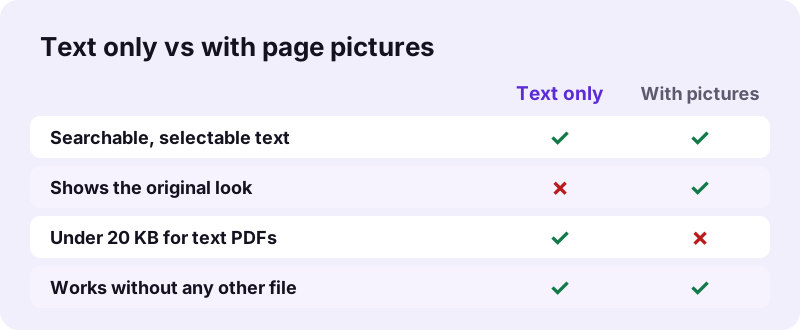
Leave the pdf24 PDF to HTML picture option off when you want light, searchable text for a website or an e-mail. Turn it on when readers must also see the original layout, logos and drawings: each page is then embedded as a 110 dpi JPEG under its text, still inside the same single file.
| Test file | Option | Result | Time |
|---|---|---|---|
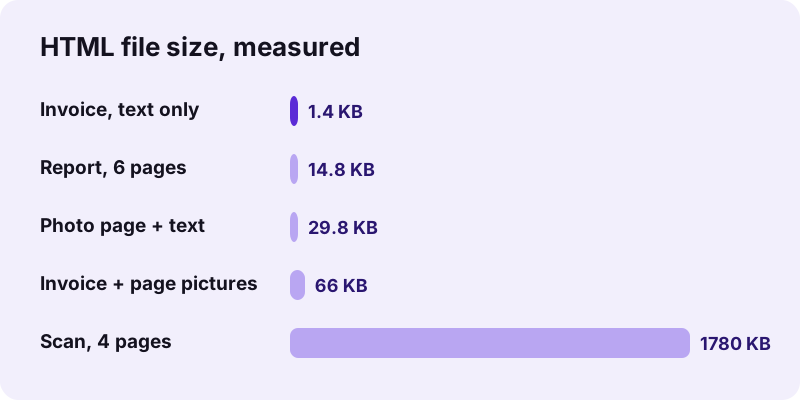
| Invoice, 2 pages | Text only | 1.4 KB | 0.3 s |
| Invoice, 2 pages | Picture of every page | 66 KB | 0.4 s |
| Report, 6 pages | Text only | 14.8 KB | 0.4 s |
| Scan, 4 pages | Pictures always (no text) | 1.78 MB | 11.9 s |
The pictures are stored as base64 data URLs, so the HTML file never points to a separate image that could go missing when you move or e-mail it. Base64 makes each image about a third larger than a JPEG file would be, which is why the option is off by default.
Can pdf24 PDF to HTML convert scans and photos?
Scanned pages have no text, so pdf24 PDF to HTML places each of them as a page picture automatically and reports how many pages had no selectable text. Photos and charts on pages that do have text are not copied in text-only mode; tick the picture option or extract them separately.
Our 4-page scan became a 1.78 MB HTML file with 4 page pictures in 11.9 seconds. On a test page with a heading, a sentence and three pictures, the text-only HTML (29.8 KB) kept the heading and sentence but not the pictures. Use OCR PDF to turn scans into real text, and Extract images to save the photos for your web page.
pdf24 PDF to HTML for websites, e-mail and accessibility
A web page is easier to read on a phone than a PDF: text reflows to the screen, search engines read it like any page, and screen readers announce headings, lists and table headers. Converting a PDF notice, menu, price list or report to HTML makes it usable without a PDF viewer.
- Website: publish a PDF announcement as a real page that loads fast and can be indexed.
- Newsletter: paste the body into an e-mail editor instead of attaching a PDF.
- Accessibility: th header cells and heading tags give screen readers structure that many PDFs lack.
- Archive: a single .html file opens in any browser, now and in years to come.
Check the result before publishing: a heading detected from a large font may need its level changed, and decorative lines from the PDF are not part of the HTML.
Is pdf24 PDF to HTML private?
pdf24 PDF to HTML runs entirely in your browser: the PDF is read with the File API, the HTML is assembled in JavaScript and offered as a download. In every test the page sent 0 upload requests and showed 0 bytes uploaded, so internal reports and drafts stay on your device.
Watch the Network tab of the developer tools (F12) during a conversion to see it for yourself. The File API on MDN explains how a page reads local files without sending them.
pdf24 PDF to HTML compared with other text formats
HTML is the right format when the result will be read in a browser or pasted into a website. Markdown suits documentation and wikis, plain text suits copying words into other systems, EPUB suits e-readers, and Word suits further editing with page layout.
| Format | Best for | Our tool |
|---|---|---|
| HTML | Web pages, e-mail, browsers | this page |
| Markdown | Docs, wikis, README files | PDF to Markdown |
| TXT | Words only, any program | PDF to TXT |
| EPUB | E-readers and book apps | PDF to EPUB |
| DOCX | Editing in Word | PDF to Word |
pdf24 PDF to HTML: frequently asked questions
Is pdf24 PDF to HTML free?
Yes. It is free with no account, no watermark and no daily limit. The work happens in your own browser, so there is no server cost per file. Convert as many PDFs as you need; each HTML file is yours to publish, edit or share without any credit line added.
Does pdf24 PDF to HTML keep the layout of the PDF?
It keeps the structure, not the exact look: headings, paragraphs, lists and tables become real HTML that reflows on any screen. Columns, text boxes and exact positions are not copied. To show the original look too, tick Add a picture of every page; each page is then embedded as an image.
Are images saved as separate files by pdf24 PDF to HTML?
No. Page pictures are embedded inside the HTML as base64 JPEG data, so you only ever have one file to move or e-mail. Photos from text pages are not copied in text-only mode. Save them with Extract images if you need them as separate files for a website.
Does pdf24 PDF to HTML upload my PDF?
No. The PDF is read and converted by your browser on your device. During our tests, 0 upload requests left the page, and the result line confirmed 0 bytes uploaded. Nothing is stored after you close the tab, so drafts and internal documents stay private.
Is pdf24 PDF to HTML a PDF24 product?
No. pdf24tools is an independent site and is not affiliated with PDF24 or Geek Software GmbH. This converter is our own browser code that uploads nothing and needs no installation. The page names are short and familiar, but the website, the code and the team behind it are separate.
Can pdf24 PDF to HTML make a scanned PDF searchable?
No. A scan has no text layer, so each scanned page is placed as a picture in the HTML and the note tells you how many pages had no selectable text. Run OCR PDF first to add real text, then convert again to get headings and paragraphs you can search.
Does pdf24 PDF to HTML keep links?
No. Only text and its bold and italic styling are rebuilt; web links in the PDF become plain text. Add them back in your editor with an a tag. Each page section has an id such as page-2, so you can link to a page inside the HTML file itself.
How big is a pdf24 PDF to HTML file?
Text-only results are tiny: our 2-page invoice gave 1.4 KB and our 6-page report 14.8 KB. Page pictures add weight, so the same invoice with pictures was 66 KB and a 4-page scan 1.78 MB. There is no fixed size limit; the device's memory is the only limit.
Can I paste pdf24 PDF to HTML output into WordPress?
Yes. Open the .html file in a text editor, copy everything between the opening and closing body tags and paste it into the code or HTML view of the WordPress editor. Your theme then styles the headings, lists and tables. Remove the section wrappers if you do not need page divisions.
Does pdf24 PDF to HTML work on a phone?
Yes, in Safari or Chrome on iPhone, iPad and Android. The .html is saved to Files or Downloads and opens in the phone's browser. Because the file includes a viewport tag and a narrow text width, it is easy to read on a small screen without zooming.
Which heading tags does pdf24 PDF to HTML use?
Lines set in a clearly larger font than the body text become headings, written as h2, h3 or h4 depending on their size. h1 is left free, so you can add your own page title when you publish the file. Check the levels before publishing, since font size is only a hint.
pdf24 PDF to HTML: sources
- HTML — Wikipedia
- File API — MDN Web Docs
- HTML: HyperText Markup Language — MDN Web Docs