How to make an e-book with pdf24 tools PDF to EPUB in 4 steps
- Choose the PDF. Tap Choose a file or drop one PDF on the box; it is read on your device only.
- Add title and author. Both fields are optional; empty fields take the PDF's stored title and author, or the file name.
- Press Convert to EPUB. The text is split into chapters and packed as an EPUB 3 book, usually in under a second.
- Open it on your e-reader. Send the .epub to Apple Books, Google Play Books, Kobo, a Kindle (via Send to Kindle) or any EPUB app.
What does pdf24 tools PDF to EPUB put in the e-book?
pdf24 tools PDF to EPUB writes an EPUB 3 package with one XHTML file per chapter, a navigation document that e-readers show as the table of contents, a small stylesheet and the book metadata: title, author, language and a unique identifier. Paragraphs, headings, bullet lists, bold, italic and column tables are rebuilt as real e-book text.
“EPUB is supported by many e-readers, and compatible software is available for most smartphones, tablets, and computers.”
Our 6-page report gave chapter1.xhtml to chapter6.xhtml, nav.xhtml, style.css and content.opf inside the ZIP, with the mimetype entry first and uncompressed, as EPUB requires. The stylesheet sets a serif body font with 1.5 line spacing and sans-serif headings; your e-reader can still override the font and size.
pdf24 tools PDF to EPUB chapter rules
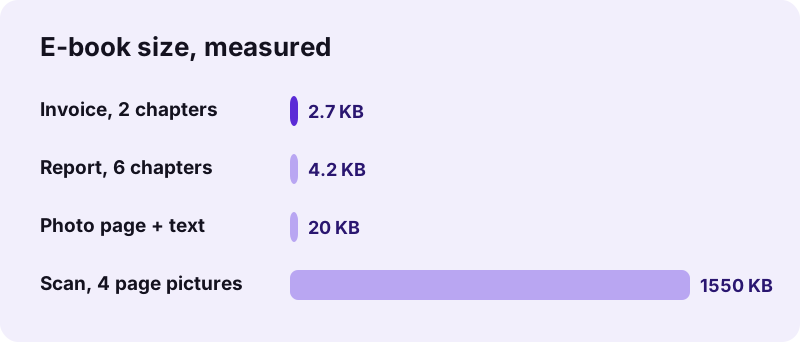
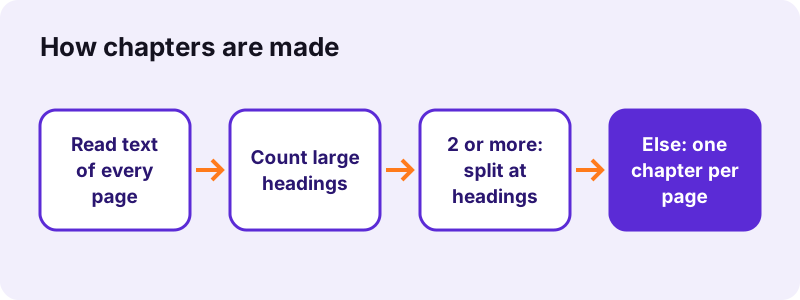
When the PDF has at least 2 large headings, a new chapter starts at each of them and the heading becomes the chapter name in the table of contents. When it has fewer, each PDF page becomes one chapter named after its page number. Our invoice, with one heading, became 2 chapters: one per page.
pdf24 tools PDF to EPUB title and author
Type a title and an author in the two optional fields, and they go into the book's metadata, where e-reader libraries display and sort them. Empty fields fall back to the title and author stored in the PDF, then to the file name. Our test with the title Invoice 142 showed that name in the library.
pdf24 tools PDF to EPUB with tables and right-to-left text
Column-aligned text becomes an HTML table with cell borders that scales to the screen width. Paragraphs in Arabic, Hebrew, Persian or Urdu get a right-to-left direction, so they read correctly in the e-reader.
pdf24 tools PDF to EPUB tip for long reports
If a long report ends up with one chapter per page, the table of contents gets very long. Give the real section titles a larger font in the source document before making the PDF, or accept page chapters and use the e-reader's search.
Why turn a PDF into EPUB with pdf24 tools PDF to EPUB?
A PDF keeps a fixed page, so on a 6-inch e-reader or a phone you zoom and scroll sideways on every line. An EPUB made with pdf24 tools PDF to EPUB reflows: the text wraps to the screen, you choose font and size, and the reader remembers your position, which makes long documents comfortable to read.
| Point | EPUB | |
|---|---|---|
| Text wraps to the screen | No, fixed page | Yes |
| Change font and size | Zoom only | Yes |
| Table of contents | Only if bookmarks exist | Always (nav document) |
| Exact original layout | Yes | No |
| Typical text-only size | Our report: 5.1 KB | Our book: 4.2 KB |
Keep the PDF when the layout itself matters, such as a designed magazine, a form or a music score. Convert to EPUB for reports, manuals, articles, theses and novels you want to read on the go.
Can pdf24 tools PDF to EPUB convert scanned books?
Scanned pages hold pictures, not letters, so pdf24 tools PDF to EPUB cannot reflow them. Each scanned page is placed in its own chapter as a 120 dpi picture: our 4-page scan became a 1.55 MB book of 4 picture chapters in 15.4 seconds. Run OCR first to get text that reflows.
After OCR PDF has added a text layer, the same scan converts into reflowable paragraphs. Check the result on the e-reader, because OCR mistakes such as broken words are easier to spot in reflowed text than on a picture of the page.
- Scan or photograph pages straight and at 300 dpi or more for the best OCR.
- Remove blank pages first with Remove PDF pages, so they do not become empty chapters.
- Photos on pages with text are not copied into the book; scanned pages without text keep their picture.
What pdf24 tools PDF to EPUB does not keep
The e-book is built from the text layer, so a few things from the PDF do not arrive: photos, charts and logos on pages that contain text, vector drawings, headers and footers as layout, links, form fields and the original fonts. Pages without text are kept as one picture each.
On our test file with a heading, a sentence and three pictures on page 1, the EPUB (20 KB, 2 chapters) kept the heading and sentence but not the pictures; page 2, with almost no text, became a page picture. Save pictures separately with Extract images if you need them, for example in an EPUB editor.
Running headers and page numbers are ordinary text lines in a PDF, so they can appear inside chapters; most readers barely notice them, and an EPUB editor removes them quickly.
Is pdf24 tools PDF to EPUB private?
pdf24 tools PDF to EPUB runs in your browser: the PDF is read with the File API and the EPUB package is zipped in JavaScript on your device. Every test run showed 0 upload requests and 0 bytes uploaded, so manuscripts and private documents are never sent to a server or kept anywhere.
You can check this with the Network tab of the browser's developer tools (F12). The File API on MDN explains how a web page reads a local file without uploading it.
pdf24 tools PDF to EPUB on Kindle, Kobo, Apple Books and phones
The .epub opens in Apple Books, Google Play Books, Kobo readers, Thorium, Calibre and most reading apps on Android and iPhone. Current Kindles accept EPUB through Amazon's Send to Kindle service, which converts the book for the device.
- iPhone and iPad: tap the .epub in Files and choose Books.
- Android: open it with Google Play Books or another EPUB app.
- Kobo: copy the file to the reader over USB.
- Kindle: use Send to Kindle by e-mail, app or web page.
- Windows, Mac, Linux: read it in Calibre or Thorium.
The converter page itself works in any modern browser on these systems, so you can make the book on the phone you will read it on. Need the reverse? EPUB to PDF turns an e-book back into pages.
pdf24 tools PDF to EPUB: frequently asked questions
Is pdf24 tools PDF to EPUB free?
Yes. It is free with no account, no watermark and no daily limit. The e-book is made on your own device, so there is no server cost per file. Convert as many PDFs as you want; each EPUB is a normal file you can keep, edit in an EPUB editor and copy to your e-readers.
Which EPUB version does pdf24 tools PDF to EPUB create?
It creates EPUB 3 books: an OPF package version 3.0 with a navigation document for the table of contents, XHTML chapters, a stylesheet, a unique identifier and a modified date. EPUB 3 is the current version of the format and is read by all major e-reader apps and devices sold in recent years.
Can I read a pdf24 tools PDF to EPUB book on a Kindle?
Yes, through Amazon's Send to Kindle service, which accepts EPUB files by e-mail, app or web upload and converts them for the Kindle. Copying the .epub directly over USB does not work on Kindles, because they do not open EPUB files natively.
Does pdf24 tools PDF to EPUB keep pictures?
Only for pages without text, such as scans, which become one picture each. Photos, charts and logos on pages that contain text are not copied, because the book is built from the text layer. Save those pictures with Extract images and add them in an EPUB editor if you need them.
Does pdf24 tools PDF to EPUB upload my file?
No. Your browser reads the PDF and builds the e-book locally. In our tests 0 upload requests left the page and the result line showed 0 bytes uploaded. Nothing is stored after you close the tab, so unpublished manuscripts and private papers stay on your device.
Is pdf24 tools PDF to EPUB made by PDF24?
No. pdf24tools is an independent website and is not affiliated with PDF24 or Geek Software GmbH. This converter is our own browser code, with no upload, no account and nothing to install. Only the short page names look familiar; the site and the team are separate.
How does pdf24 tools PDF to EPUB split chapters?
If the PDF has at least 2 large headings, every such heading starts a new chapter and names it in the table of contents. Otherwise each PDF page becomes one chapter, named by its page number. Our 2-page invoice, with a single heading, therefore became 2 page chapters.
Can pdf24 tools PDF to EPUB set the book title and author?
Yes. Type them in the two optional fields before converting; they are written into the book metadata that e-reader libraries show. Leave them empty to use the title and author stored in the PDF, or the file name if the PDF has none.
Why is my pdf24 tools PDF to EPUB book so large?
The PDF probably contains scanned pages, which are stored as pictures: our 4-page scan made a 1.55 MB book, while our 6-page text report made only 4.2 KB. Run OCR PDF on the scan first, and the pages become text that is far smaller and reflows on the screen.
Does pdf24 tools PDF to EPUB keep tables?
Yes, when the PDF's table text is aligned in columns. Such lines become an HTML table in the chapter, with cell borders and full screen width. Very wide tables are hard to read on a small e-reader in any format; turn the device sideways or zoom where the app allows it.
Can I edit the pdf24 tools PDF to EPUB result?
Yes. The book is a standard EPUB, so free EPUB editors such as Sigil or Calibre's editor open it. You can rename chapters, remove running headers, add a cover picture and fix OCR errors there. The chapters are plain XHTML, which keeps editing simple.