How to use pdf24 HEIC to PNG in 4 steps
- Choose the HEIC photos. Tap Choose images or drop .heic or .heif files on the box.
- Check the list. Every file in the list becomes one PNG; remove any photo you do not need.
- Press Convert images. The HEIC decoder loads on the first run, then each photo is saved as PNG on your device.
- Download. One photo downloads as .png; several come as one ZIP with a PNG for each photo.
Why use pdf24 HEIC to PNG instead of JPG?
pdf24 HEIC to PNG is the better choice when you will keep working on the photo. PNG stores the decoded pixels without loss, so cropping, retouching and saving again add no new artefacts. JPG is smaller and fine for sharing, but each new JPEG save compresses the picture once more.
Typical PNG uses: product photos that a designer will cut out, screenshots of iPhone screens taken as photos, pictures that need text or arrows on top, and photos going into a slide deck or a website builder that recompresses JPGs. For sharing with family or uploading to a form, JPG is usually enough.
“HEVC is an image and video encoding format and the default image codec used with HEIF.”
pdf24 HEIC to PNG file sizes
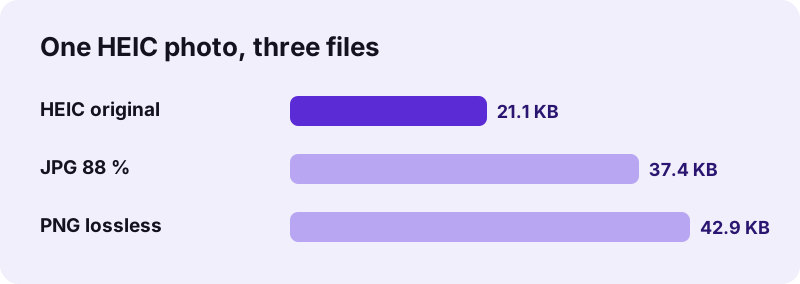
Lossless means larger. Our small test photo became 42.9 KB as PNG against 37.4 KB as JPG and 21.1 KB as HEIC. A full 12-megapixel iPhone photo grows much more: in our JPG to PNG test a 4032 × 3024 photo needed 15.03 MB as PNG, so plan for roughly that per photo.
pdf24 HEIC to PNG and transparency
The PNG is written with an alpha channel, but camera photos have no transparent pixels: in our output every pixel was fully opaque. The channel becomes useful once you remove a background in an editor, because PNG keeps the transparency you add, while JPG would fill it.
pdf24 HEIC to PNG for editing software
Older versions of image editors and many web tools cannot read HEIC, but every editor reads PNG. Converting first avoids codec problems and makes sure the editor works from all the original detail, not from a JPEG copy.
pdf24 HEIC to PNG: tip for large batches
PNG files of full-size photos are large, so a batch of 20 iPhone photos can produce a ZIP of several hundred megabytes. Convert only the photos you will edit, and use the JPG converter for the rest.
Does pdf24 HEIC to PNG keep the full quality?
pdf24 HEIC to PNG keeps every pixel the browser decodes from the HEIC, at the same width and height, 1200 × 900 in our test. Nothing is compressed lossily on the way. Two details change: HDR or 10-bit colour becomes standard 8-bit colour, and EXIF data such as GPS position is not written into the PNG.
| Property | Result |
|---|---|
| Pixel size | Same as the HEIC (1200 × 900 in our test) |
| Compression | Lossless PNG |
| Colour | 8-bit RGB plus alpha channel |
| EXIF / GPS | Not included |
| Time for one photo | 1.3 s including decoder load |
| Several photos | One ZIP file |
The PNG converter has no quality setting, because there is nothing to choose: lossless output is always the same. If you need a smaller file, the JPG converter offers quality levels from 60 to 95 %.
pdf24 HEIC to PNG or HEIC to JPG: a quick comparison
Both converters use the same HEIC decoder; they differ only in how the result is stored.
| PNG output | JPG output | |
|---|---|---|
| File size | 42.9 KB | 37.4 KB at 88 %, 29.3 KB at 60 % |
| Compression | Lossless | Lossy, adjustable |
| Transparency possible later | Yes | No |
| Best for | Editing, design, cut-outs | Sharing, email, forms |
Pick pdf24 HEIC to PNG when the photo is a starting point for more work, and JPG when the photo is the final product. If you are unsure, convert to PNG once and keep it as your working master: you can always make a smaller JPG from the PNG later, but you cannot get back detail that a JPEG save has already removed. For a photo that only needs to reach a relative's phone, the JPG is the more practical file.
Is pdf24 HEIC to PNG safe for private photos?
pdf24 HEIC to PNG is safe because no photo is uploaded. The browser reads the files with the File API, decodes them with JavaScript inside the page and writes the PNG with its own canvas encoder. The result line shows 0 bytes uploaded, and after loading the page the converter even works in airplane mode.
- No account, no watermark, no app or codec to install.
- Nothing is kept after you close the tab.
- Smaller files for sharing: HEIC to JPG.
- Photos as a document: HEIC to PDF.
pdf24 HEIC to PNG on Windows, Android, iPhone and Mac
The converter runs in any current browser on desktop and mobile.
On Windows and Android, HEIC files often do not open at all without extra codecs; the browser decodes them for you. On an iPhone, Safari's photo picker may pass a JPEG copy instead of the HEIC; save the original to Files and pick it from there to get the full data. On a Mac, drag photos from Finder onto the box, or click Choose images and browse to them.
PNG is an open, royalty-free format, standardised by the W3C and as ISO/IEC 15948, which is one reason every operating system, browser and editor supports it. HEIC, by contrast, depends on HEVC, a compression method with patent licensing, and support differs between devices. Saving important edits as PNG therefore keeps them usable on any computer for a long time, independent of which phone took the original photo.
pdf24 HEIC to PNG: frequently asked questions
Is pdf24 HEIC to PNG free?
Yes. pdf24 HEIC to PNG on this site is free, with no account, no watermark and no photo limit. The HEIC decoder and the PNG encoder run inside your browser, so there are no server costs. You also do not need to install any codec, app or browser extension.
Is pdf24 HEIC to PNG part of PDF24?
No. pdf24tools is an independent website and is not affiliated with PDF24 or Geek Software GmbH. We use the search phrase in our titles because people type it, but the converter, its code and the measurements on this page are our own. Your photos are processed only on your device.
Is pdf24 HEIC to PNG lossless?
Yes. PNG compression is lossless, so the PNG holds exactly the pixels the browser decoded from the HEIC, at the same size. Nothing is blurred or blocky. Only colour depth beyond 8 bits per channel, used by some HDR photos, is reduced, because the browser decodes images to 8-bit colour.
Why is the PNG so big after pdf24 HEIC to PNG?
Lossless storage of a camera photo needs many bytes. Our small 1200 × 900 photo became 42.9 KB as PNG, and a full 12-megapixel photo can reach about 15 MB. Use PNG for photos you will edit, and the JPG converter for photos you only want to share.
Does pdf24 HEIC to PNG upload my photos?
No. The photos are read with the browser File API and converted locally. The result line reports 0 bytes uploaded and nothing is stored. You can load the page, switch on airplane mode and convert, which shows that no server takes part in the conversion of your photos.
Can pdf24 HEIC to PNG convert several photos at once?
Yes. Select all the HEIC files. One photo downloads as a single PNG, two or more as one ZIP file containing a PNG for each, named like the original photos. Keep an eye on the total size, because full-size PNG photos are large.
Does pdf24 HEIC to PNG keep GPS and date information?
No. The PNG is written from the pixels only, so EXIF details such as GPS coordinates, date taken and camera model are left out. That protects privacy when you share the file. Keep the original HEIC if you need that information for your photo archive.
Does pdf24 HEIC to PNG make the background transparent?
No. The PNG has an alpha channel, but a camera photo is fully opaque, so nothing becomes transparent by itself. Remove the background in an image editor afterwards; the PNG will keep the transparency you create, which a JPG could not do.
Does pdf24 HEIC to PNG work on Windows without HEIC support?
Yes. The decoder is part of the web page, so Windows needs no HEIF or HEVC extension. Use Chrome, Edge or Firefox, drop the photos on the box and save the PNG files, which open in Photos, Paint and every other image program.
Why is pdf24 HEIC to PNG slow on the first photo?
The first conversion loads the HEIC decoder into the page, and decoding HEVC-compressed photos takes real computing work. Our first photo took 1.3 s on a laptop including that load. Later photos in the same visit start immediately, and phones are slower than computers.
Can pdf24 HEIC to PNG handle HEIF files?
Yes. Files ending in .heic and .heif, and files labelled image/heic or image/heif, are accepted. A HEIF file that contains several images gives one PNG per image, numbered -page-1, -page-2 and so on, packed together in one ZIP file.
More pdf24 HEIC to PNG tools and guides
pdf24 HEIC to PNG: sources
- High Efficiency Image File Format — Wikipedia
- Portable Network Graphics (PNG) Specification — W3C
- Using HEIF or HEVC media on Apple devices — Apple Support