How to use pdf24 convert PDF to grayscale in 4 steps
- Choose the PDF. Tap Choose PDF file or drop the PDF on the box. The file is read from your disk and never sent to a server.
- Pick a resolution. 100 DPI gives the smallest file, 150 DPI suits screen and email, 200 DPI prints well and 300 DPI gives sharp print.
- Press the button. Every page is drawn, each pixel is turned into grey with the 0.299/0.587/0.114 luma weights, and a new PDF is built.
- Download and check. Save the -grayscale.pdf file and open it. Page count and page size are the same as in the original.
What does pdf24 convert PDF to grayscale do to each page?
pdf24 convert PDF to grayscale renders every page as a picture at the DPI you choose, replaces each pixel's red, green and blue values with one grey value, and stores the grey picture as a JPEG page of the same size. A pure red area (229, 25, 25) in our test came out as an even grey of 87.
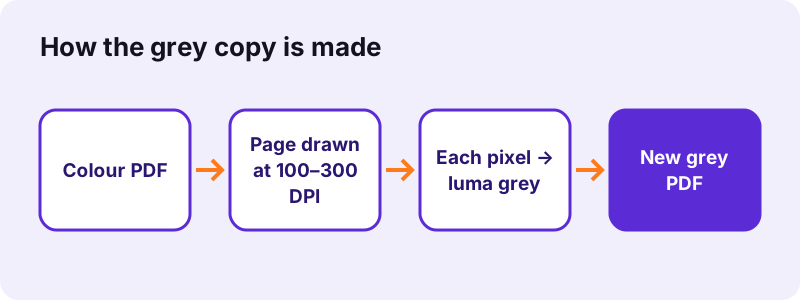
The grey value is the weighted sum used by television standard Rec. 601: 29.9 % of red, 58.7 % of green and 11.4 % of blue. Green counts most because the eye is most sensitive to it, so a light green heading stays light and a dark blue logo stays dark instead of everything turning to the same mid grey.
“a nonlinear luma component (Y′) is calculated directly from gamma-compressed primary intensities as a weighted sum”
pdf24 convert PDF to grayscale: why pages become pictures
A PDF can store colour in dozens of places: text colour, vector fills, embedded photos, shading patterns, transparency groups. Rewriting each of those safely is fragile, so the tool takes the reliable route: it paints the finished page and converts the pixels. The price is that the text layer is gone, which the result note states: Pages were redrawn as pictures, so the text can no longer be selected or searched.
pdf24 convert PDF to grayscale on iPhone and Android
The converter runs in Safari, Chrome, Edge and Firefox on phones and tablets. A 4-page 8.07 MB scan took 9.72 seconds on a laptop at 150 DPI; a phone needs longer for large scans, so choose 100 or 150 DPI there and keep the screen on until the download appears.
pdf24 convert PDF to grayscale on Windows and Mac
On a computer nothing has to be installed and no printer driver is involved. Unlike printing to a PDF printer with a black-and-white setting, the result is the same in every browser and on every operating system, because the conversion is done by the page itself.
pdf24 convert PDF to grayscale: tip for crisp text
Small print such as 8-point footnotes stays readable at 200 DPI. If the grey copy must also be searchable, run OCR PDF on the result: it adds a new text layer on top of the grey pictures.
Does pdf24 convert PDF to grayscale make the file smaller?
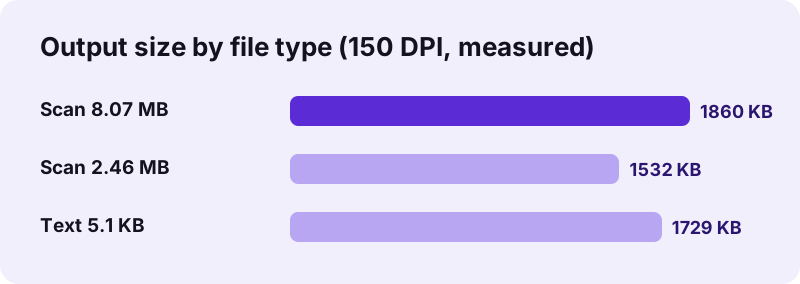
pdf24 convert PDF to grayscale makes scans smaller but text PDFs bigger. Our 8.07 MB colour scan became 1.82 MB at 150 DPI and the 2.46 MB contract scan became 1.50 MB, while a 5.1 KB text file grew to 1.69 MB, because its text is now stored as six page pictures.
| Test file | DPI | Before | After | Time |
|---|---|---|---|---|
| text-6p.pdf (6 pages, typed text) | 100 | 5,238 bytes | 976,757 bytes | 1.46 s |
| text-6p.pdf | 150 | 5,238 bytes | 1,770,658 bytes | 1.54 s |
| text-6p.pdf | 300 | 5,238 bytes | 4,430,172 bytes | 4.16 s |
| contract-scan-5p.pdf (5 scanned pages) | 150 | 2,583,035 bytes | 1,568,525 bytes | 3.66 s |
| scan-4p.pdf (4 scanned pages) | 150 | 8,463,060 bytes | 1,904,570 bytes | 9.72 s |
Resolution drives the size: each step from 100 to 300 DPI roughly doubles the pixels per page, and the 6-page text file went from 954 KB to 4.22 MB across that range. If the grey file is too heavy for an upload form, run it through Compress PDF afterwards.
pdf24 convert PDF to grayscale for upload limits
Portals that demand black-and-white scans under 1 MB are common for job, visa and court forms. Convert at 100 DPI first; if the file is still over the limit, a page such as compress PDF to 1 MB finishes the job.
Which resolution should pdf24 convert PDF to grayscale use?
The resolution setting decides sharpness and size of the grey pages. 150 DPI is the default and suits reading on screen and email; 100 DPI gives the smallest grayscale file, 200 DPI prints cleanly on an office laser printer, and 300 DPI keeps small print and fine lines sharp for archiving.
| Setting | Page picture (A4) | Best for |
|---|---|---|
| 100 DPI (small file) | 826 × 1169 px | Upload portals with tight limits |
| 150 DPI (screen and email) | 1240 × 1754 px | Reading on screen, email |
| 200 DPI (good print) | about 1654 × 2339 px | Office printing |
| 300 DPI (sharp print) | 2479 × 3508 px | Archive copies, small print |
The pixel sizes at 100, 150 and 300 DPI were read from our output files; the 200 DPI row is calculated from the A4 page size of 595 × 842 points.
When to use pdf24 convert PDF to grayscale
Grayscale copies are useful when colour costs money, breaks a rule or simply gets in the way: printing long documents on a laser printer, sending a scan to an office that asks for black-and-white, faxing, or checking how a design reads for people who see contrast better than hue.
- Print a 100-page manual without colour toner.
- Submit an application form that must be in black and white.
- Turn yellowish phone scans into neutral grey pages.
- Check whether a chart is still readable without its colours.
For the opposite effect, light text on a dark page, use Invert PDF. To turn pages into pictures without changing their colours, use Rasterize PDF.
pdf24 convert PDF to grayscale for printing
Many printers set to black only still use colour toner to make a rich black. A file that is already grey removes that guesswork: the printer receives nothing but grey pixels, so the output matches the screen.
Is pdf24 convert PDF to grayscale safe for private files?
pdf24 convert PDF to grayscale never uploads your PDF: the browser reads it with the File API, pdf.js draws the pages and the grey copy is built in memory on your device. Every one of our runs ended with "0 bytes uploaded" on the result line, and closing the tab removes all traces.
That makes the tool suitable for ID scans, medical letters and contracts. The grey copy also carries none of the old document info: title, author and creator tool of the source are not copied into the new file.
Password-protected PDFs must be opened first. Remove the password with Unlock PDF, convert the copy, and protect the grey file again with Lock PDF if needed.
pdf24 convert PDF to grayscale: what is kept and what changes
The grey copy keeps the page count, page size and order of the original exactly. What changes is everything that depended on the PDF being vector and text based: selection, search, links and form fields no longer work, because each page is now a single JPEG picture.
| Feature | After conversion |
|---|---|
| Pages, page size, order | Same as the original |
| Look of text and pictures | Same, in grey |
| Selectable or searchable text | No (0 characters in our test) |
| Links, bookmarks, form fields | Not kept |
| Document info (title, author) | Not copied |
pdf24 convert PDF to grayscale not working? Fixes
When the grey conversion stops or the result looks wrong, the cause is usually a password, a damaged file, or a very large scan on a phone with little memory. The table lists the symptom, the reason behind it and the quickest fix for each case.
| Symptom | Cause | Fix |
|---|---|---|
| Error before any page is drawn | Password-protected file | Unlock PDF first |
| Some pages are blank or fail | Damaged structure | Run Repair PDF, then convert |
| Tab reloads on a phone | Not enough memory for 300 DPI | Use 100 or 150 DPI |
| Text cannot be copied | Pages are pictures now | Run OCR PDF on the grey copy |
Damaged files often open again after Repair PDF rebuilds their index; the repaired copy converts normally.
pdf24 convert PDF to grayscale: frequently asked questions
Is pdf24 convert PDF to grayscale free?
Yes. pdf24 convert PDF to grayscale on pdf24tools costs nothing, needs no account and adds no watermark. There is no daily limit either, because all the work runs on your own phone or computer and no server time is used. You can convert as many PDFs as you like and keep every result.
Does pdf24 convert PDF to grayscale keep text selectable?
No. Each page is redrawn as a single grey picture, so the text layer is gone: our 6-page file had 13,806 characters of text before and 0 after. The page still looks the same. If you need searchable text, run OCR PDF on the grey copy, which adds an invisible text layer again.
Why is the file bigger after pdf24 convert PDF to grayscale?
A typed-text PDF stores letters as tiny instructions, while the grey copy stores each page as a picture. That is why our 5.1 KB text file grew to 1.69 MB at 150 DPI. Scans behave the other way: our 8.07 MB colour scan shrank to 1.82 MB, because grey JPEG pages are lighter.
Which formula does pdf24 convert PDF to grayscale use?
Every pixel gets the Rec. 601 luma value: 0.299 times red plus 0.587 times green plus 0.114 times blue. That weighting follows how bright each colour looks to the human eye, so dark and light areas keep their contrast. Our check found a channel spread of 0 on every sampled pixel, meaning pure grey.
Can pdf24 convert PDF to grayscale do only some pages?
The tool converts every page of the file. To grey out only part of a document, split out the pages first with Extract PDF pages, convert that file, and then put the parts back together in the right order with Merge PDF. The page size of every converted page stays exactly the same.
Is my PDF uploaded by pdf24 convert PDF to grayscale?
No. The file is read with the browser File API and processed by pdf.js and pdf-lib in memory on your device. The result line shows 0 bytes uploaded, nothing is stored on a server, and closing the tab clears the data. You can even go offline once the page has loaded.
Does pdf24 convert PDF to grayscale work on a phone?
Yes. pdf24 convert PDF to grayscale runs in Safari on iPhone and iPad and in Chrome, Edge or Firefox on Android. Small files finish in a second or two. For scans of 5 MB and more, pick 100 or 150 DPI on a phone: 300 DPI pages hold four times as many pixels and can exhaust the memory of older devices.
What resolution should I choose in pdf24 convert PDF to grayscale?
Use 150 DPI for screen and email, which is the default. Choose 100 DPI when an upload form has a strict size limit, 200 DPI for office printing and 300 DPI for small print or archive copies. On our 6-page test file the four settings ranged from 954 KB at 100 DPI to 4.22 MB at 300 DPI.
Does pdf24 convert PDF to grayscale make pure black and white?
No. The result has 256 shades of grey, which keeps photos, logos and shaded tables readable. A strict two-colour black-and-white file would turn light grey text white and lose detail. Most offices that ask for black-and-white documents accept grayscale, because it prints with black toner only.
Is pdf24tools the official pdf24 convert PDF to grayscale tool?
No. pdf24tools is an independent website and is not affiliated with PDF24 or Geek Software GmbH. Our grayscale converter is our own build on the open-source pdf.js and pdf-lib libraries and runs entirely in your browser. The name only describes what people search for when they want a free grey copy.
Does pdf24 convert PDF to grayscale keep links and form fields?
No. Because every page becomes one picture, clickable links, bookmarks, fillable fields and comments do not survive. If a form must stay fillable, fill it in first, then convert. If you only need the fields burnt in without losing text, use Flatten PDF instead, which keeps the text layer.
Can I undo pdf24 convert PDF to grayscale?
Not from the grey file: once the colours are averaged into one grey value, the original red, green and blue values are gone. Your source PDF is never changed, though. The tool writes a new file named -grayscale.pdf and leaves the original untouched on your device, so keep it if you may need colour later.
pdf24 convert PDF to grayscale: sources
- Grayscale — Wikipedia
- File API — MDN Web Docs
- PDF (Portable Document Format) Family — Library of Congress