How to use pdf24 invert PDF colors in 4 steps
- Choose the PDF. Tap Choose PDF file or drop the PDF on the box. It is read from your disk, not uploaded.
- Pick how to invert. Full negative flips every colour; Dark mode (keep colours) turns the page dark but keeps hues such as red warnings and blue links recognisable.
- Pick a resolution and press the button. 150 DPI is the default for reading on screen. Each page is drawn, its pixels are inverted and a new page is stored.
- Download. Save the -inverted.pdf file and open it in any PDF reader, on any device, with no dark-mode setting needed.
What does pdf24 invert PDF colors do to a page?
pdf24 invert PDF colors draws each page as a picture, subtracts every red, green and blue value from 255, and saves the result as a new page of the same size. White (255, 255, 255) becomes black (0, 0, 0), so a printed-looking document turns into light text on a dark background.
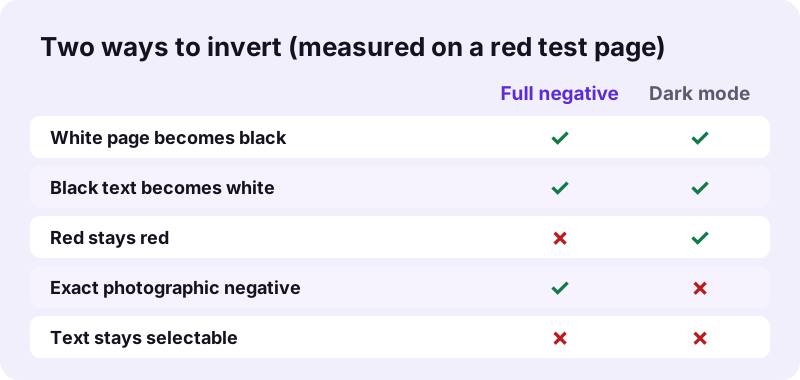
The same arithmetic is what screen filters do. The full negative is the classic photo-negative look: every hue moves to its opposite on the colour wheel, so red turns cyan and yellow turns blue. That is exact and reversible on the pixels, but colour-coded charts lose their meaning.
“The invert() CSS function inverts the color samples in the input image.”
pdf24 invert PDF colors in dark mode
Dark mode (keep colours) applies the inversion and then rotates every hue by 180 degrees, the same matrix as the CSS hue-rotate(180deg) filter. The two hue flips cancel out, so only brightness is inverted: in our test the red area stayed red (255, 143, 142) while the white page turned black.
pdf24 invert PDF colors on iPhone and Android
Phone readers often have no dark mode for PDFs, or apply one only inside a single app. An inverted file is dark everywhere: in Files on iPhone, in Google Drive, in a mail preview or on an e-reader. The tool runs in Safari, Chrome, Edge and Firefox on mobile.
pdf24 invert PDF colors on Windows and Mac
On a computer the conversion needs no add-on. The 5-page 2.46 MB contract scan took 3.85 seconds at 150 DPI on a laptop, and the 6-page text file took 1.51 seconds.
pdf24 invert PDF colors: tip for night reading
For reading in bed, pure white text on pure black can glare. Invert at 150 DPI and lower the screen brightness rather than the contrast; the page stays sharp and the eyes adapt faster.
pdf24 invert PDF colors: full negative or dark mode?
Choose the full negative when you need a true photographic negative, for example to check a scanned film strip or to print a stencil. Choose dark mode when you want to read or present the document: colours such as red warnings, green totals and blue links keep their hue, only light and dark swap places.
| Test pixel | Original | Full negative | Dark mode |
|---|---|---|---|
| Page background | 255, 255, 255 (white) | 0, 0, 0 (black) | 0, 0, 0 (black) |
| Red area | 229, 25, 25 | 25, 229, 228 (cyan) | 255, 143, 142 (light red) |
Values were read with PyMuPDF from our pg-colour.pdf test page and the two outputs, at 40 DPI sampling. Dark mode lifts colours slightly, which keeps them readable on the black background.
Does pdf24 invert PDF colors change the file size?
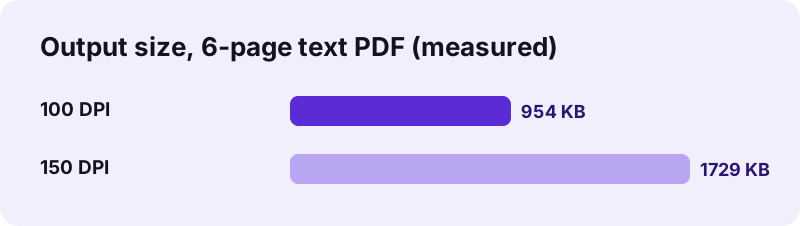
pdf24 invert PDF colors changes the size because each page is stored as a JPEG picture afterwards. Our 5.1 KB six-page text PDF became 954 KB at 100 DPI and 1.69 MB at 150 DPI, while the 2.46 MB contract scan came out at 1.49 MB. Text files grow, scans usually shrink.
| Test file | Mode, DPI | Before | After | Time |
|---|---|---|---|---|
| text-6p.pdf (6 pages) | Full, 100 | 5,238 bytes | 976,913 bytes | 1.47 s |
| text-6p.pdf | Full, 150 | 5,238 bytes | 1,770,495 bytes | 1.51 s |
| contract-scan-5p.pdf (5 pages) | Full, 150 | 2,583,035 bytes | 1,566,601 bytes | 3.85 s |
| pg-colour.pdf (1 page) | Dark mode, 150 | 1,006 bytes | 36,688 bytes | 0.95 s |
To bring a heavy inverted file down, run it through Compress PDF. Dark pages compress well because large areas are one flat colour.
When to use pdf24 invert PDF colors
An inverted PDF helps whenever a bright white page is the problem: reading at night, presenting on a dark stage screen, reading with light sensitivity or certain low-vision conditions, and checking film or microfiche scans that were captured as negatives and need to be turned back into positives.
- Read long reports at night without a white glare.
- Turn a scanned photo negative back into a positive.
- Show slides as a PDF on a dark auditorium screen.
- Prepare high-contrast copies for readers who prefer light text on dark.
For a grey copy without inversion use PDF to grayscale; to keep the colours but flatten everything into pictures use Rasterize PDF.
pdf24 invert PDF colors before printing? Usually not
A black page uses a lot of toner or ink. Print the original, or a grayscale copy, and keep the inverted file for screens.
Is pdf24 invert PDF colors safe for private documents?
pdf24 invert PDF colors runs entirely in your browser: the PDF is read with the File API, pdf.js draws the pages and pdf-lib writes the inverted copy in memory on your own device. All of our test runs reported "0 bytes uploaded", and nothing remains stored once the tab is closed.
Bank statements, medical letters and contracts can therefore be inverted without passing through anyone's server. The new file also leaves out the old document info such as title and author, because it is built from scratch.
A password-protected PDF must be unlocked first with Unlock PDF; protect the inverted copy again with Lock PDF if you share it.
pdf24 invert PDF colors: what is kept and what is lost
Page count, page size and page order stay exactly as in the original, and every visible element is inverted, including photos, logos and drawings. What is lost is everything that needs the original PDF structure: selectable text, search, links, bookmarks and form fields, since each page becomes one picture.
| Feature | After inverting |
|---|---|
| Pages, size, order | Same as the original |
| Selectable or searchable text | No: 13,806 characters before, 0 after |
| Links, bookmarks, form fields | Not kept |
| Original file | Unchanged on your device |
Need searchable dark pages? Run OCR PDF on the inverted copy to add a text layer back.
pdf24 invert PDF colors not working? Fixes
If the inverted file does not appear or looks wrong, the reason is usually a password, a damaged PDF or a phone running short of memory on a big scan. Each case has a quick fix, listed in the table below together with the symptom you will see.
| Symptom | Cause | Fix |
|---|---|---|
| Error before page 1 | Password-protected file | Unlock PDF first |
| Pages missing or blank | Damaged structure | Run Repair PDF, then invert |
| Tab reloads on a phone | Too many pixels at 300 DPI | Use 100 or 150 DPI |
| Colours look odd | Full negative chosen | Switch to Dark mode (keep colours) |
Repair PDF rebuilds a broken index; the repaired copy inverts normally.
pdf24 invert PDF colors: frequently asked questions
Is pdf24 invert PDF colors free?
Yes. pdf24 invert PDF colors on pdf24tools costs nothing, needs no account and puts no watermark on the pages. There is no daily limit, because the work runs on your own phone or computer rather than on a paid server. Invert as many documents as you need and keep every result.
Does pdf24 invert PDF colors keep the text selectable?
No. To invert everything reliably, including photos and vector drawings, each page is redrawn as one picture. Our 6-page test file had 13,806 characters of selectable text before and none after. The page looks the same, just inverted. Run OCR PDF on the result if you need searchable text again.
What is the dark mode option in pdf24 invert PDF colors?
Dark mode (keep colours) inverts brightness but not hue. It applies the negative and then rotates all hues by 180 degrees, so white still turns black, yet a red heading stays red instead of turning cyan. In our test a red area of 229, 25, 25 came out as 255, 143, 142.
Can I invert just one page with pdf24 invert PDF colors?
The tool always inverts the whole file. For a single page, take it out with Extract PDF pages, invert that small file, and if needed put it back with Merge PDF. Page size stays the same, so the inverted page fits back into the document without any gaps or scaling.
Is my file uploaded when I use pdf24 invert PDF colors?
No. The browser reads the PDF from your disk with the File API, and the inversion runs in JavaScript on your device. The result line shows 0 bytes uploaded and nothing is kept after you close the tab. Once the page has loaded you could even disconnect from the internet and it still works.
Why is my file bigger after pdf24 invert PDF colors?
Text in a normal PDF is stored as compact instructions, but after inverting each page is a picture. That turned our 5.1 KB text file into 1.69 MB at 150 DPI. Choose 100 DPI for a lighter file, 954 KB in the same test, or compress the inverted copy afterwards with Compress PDF.
Does pdf24 invert PDF colors work on iPhone and Android?
Yes. pdf24 invert PDF colors runs in Safari on iPhone and iPad and in Chrome, Edge or Firefox on Android. A one-page file finished in under a second in our test. For long scans on an older phone, use 100 or 150 DPI so the pages fit into the device's memory while they are being drawn.
Can pdf24 invert PDF colors turn a scanned negative into a positive?
Yes. Scan the film strip or negative to PDF, choose Full negative and run the tool: every colour flips back to its opposite, so the negative becomes a positive. Colour film negatives also have an orange base, so the positive may look bluish; a photo editor can correct that tint afterwards.
Can I undo pdf24 invert PDF colors?
Yes, in a practical sense: running Full negative on an inverted file flips the pixels back. The text layer does not return, though, because the pages are pictures now. The simplest way back is your original file, which the tool never changes; the inverted copy is saved under a new name ending in -inverted.pdf.
Is pdf24tools the official pdf24 invert PDF colors tool?
No. pdf24tools is an independent website and is not affiliated with PDF24 or Geek Software GmbH. Our inverter is our own build on the open-source pdf.js and pdf-lib libraries and runs only in your browser. The page name just describes what people type when they look for a way to invert colours.
Does pdf24 invert PDF colors keep links and form fields?
No. Clickable links, bookmarks, fillable fields and comments do not survive, because each page becomes a single image. Fill in a form before inverting it. If you need working links in a dark document, use your reader's own dark mode instead of changing the file itself.
Which resolution should pdf24 invert PDF colors use?
For pdf24 invert PDF colors, 150 DPI, the default, is sharp enough for reading on phones, tablets and laptops. Use 100 DPI to keep the file small, 200 DPI for large monitors or projectors, and 300 DPI only when small print must stay crisp, since it multiplies the pixels per page by four compared with 150 DPI.
pdf24 invert PDF colors: sources
- invert() CSS function — MDN Web Docs
- File API — MDN Web Docs
- Negative (photography) — Wikipedia