How to use pdf24 PNG to JPG in 4 steps
- Choose the PNG files. Tap Choose images or drop the .png files on the box. Several pictures can be converted at once.
- Pick the JPEG quality. High (88 %) for most photos, Best (95 %) for printing, Small file (60 %) for strict size limits.
- Press Convert images. Each PNG is drawn on a white background and saved as JPEG on your device.
- Download. One picture downloads as .jpg; several come as one ZIP with a JPG for each PNG.
When does pdf24 PNG to JPG make a file smaller?
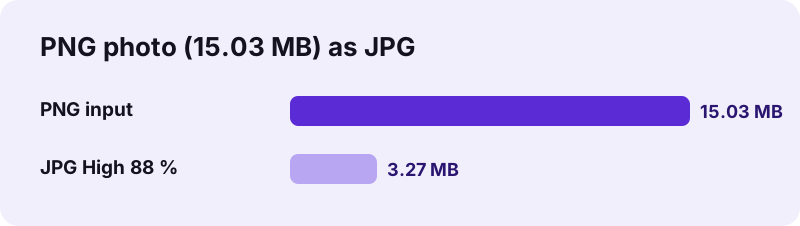
pdf24 PNG to JPG makes photos much smaller, because JPEG compression is built for camera pictures while PNG stores every pixel losslessly. Our 3024 × 4032 photo PNG dropped from 15.03 MB to 3.27 MB, 78 % less. Screenshots and flat graphics behave the other way: our 13.0 KB chart grew to 40.7 KB as JPG.
| Input PNG | PNG size | JPG 88 % | JPG 60 % |
|---|---|---|---|
| Photo, 3024 × 4032 | 15.03 MB | 3.27 MB | not measured |
| Invoice scan, 1654 × 2339 | 71.9 KB | 93.0 KB | 66.1 KB |
| Bar chart, 1200 × 800 | 13.0 KB | 40.7 KB | not measured |
| Transparent logo, 800 × 800 | 5.8 KB | 19.6 KB | not measured |
The rule of thumb: if the PNG is a photo and weighs several megabytes, converting to JPG pays off. If it is a screenshot, a chart or a logo of a few kilobytes, the PNG is usually smaller and sharper, so convert only when a JPG is required.
pdf24 PNG to JPG quality levels
Four levels are offered: Best 95 %, High 88 % (the default), Medium 75 % and Small file 60 %. The pixel size never changes. Our invoice scan went from 93.0 KB at 88 % to 66.1 KB at 60 %, with text still readable. For photos you may print, stay at 88 % or above, and compare the result with the original at full zoom before deleting the PNG.
pdf24 PNG to JPG with transparent PNGs
JPEG cannot store transparency, so the converter paints white behind the picture before saving. Our transparent logo came out on a pure white background, never black. If the logo must stay transparent, keep the PNG, or make a smaller transparent file with PNG to WebP.
pdf24 PNG to JPG for screenshots
Some portals accept only JPG uploads, even for a screenshot of a payment or an error message. Convert at Best (95 %) to keep interface text crisp; JPEG at lower levels adds soft halos around letters.
pdf24 PNG to JPG: tip for upload size limits
If a form allows, for example, 500 KB and your photo PNG is 15 MB, start at High (88 %). If the JPG is still too big, try Medium or Small file; for a document of several pictures, a PDF made with Small file reduces the pixel size as well.
Does pdf24 PNG to JPG lose quality?
pdf24 PNG to JPG uses lossy JPEG compression, so a small amount of detail is always given up; at the default 88 % this is not visible in photos. Width and height stay exactly the same. Sharp edges, text and flat colour suffer first, which is why screenshots and logos are better kept as PNG when possible.
Each new JPEG save compresses the picture once more, so convert from the original PNG every time instead of re-saving a JPG. The new file contains no EXIF data, which also removes any GPS position a photo PNG might have carried.
“Alpha blending is also used in 2D computer graphics to put rasterized foreground elements over a background.”
pdf24 PNG to JPG and colours
Colours are kept as the browser displays them. Semi-transparent pixels, such as soft shadows around a logo, are blended onto white, which is the alpha blending the quote above describes; on a white page the result looks the same as the PNG.
Is pdf24 PNG to JPG private?
pdf24 PNG to JPG is private because the pictures stay on your device. The browser reads them with the File API, draws them on a canvas and encodes the JPEG locally. The result line shows 0 bytes uploaded, nothing is stored, and the page keeps working in airplane mode once it has loaded.
- No account, no watermark, no file limit.
- Several PNGs come back as one ZIP.
- The other direction: JPG to PNG.
- Pictures into a document: PNG to PDF.
pdf24 PNG to JPG on phones and computers
The converter runs in Chrome, Edge, Firefox and Safari on Windows, macOS, Linux, Android and iOS.
Photos often end up as PNG by accident: an editing app exports PNG by default, a screenshot of a photo is saved as PNG, or a design tool exports everything losslessly. Those files fill phones and mailboxes quickly. On a computer, drop them on the box; on a phone, pick them from the gallery or Files. Running pdf24 PNG to JPG over such a folder of accidental PNG photos is one of the quickest ways to free storage space, since each 12-megapixel picture shrinks from about 15 MB to about 3 MB, as our measurement shows, while looking the same.
Our 15.03 MB photo needed 1.3 s on a laptop. Phones are slower with large pictures because the decoding and encoding run on the device, and very large batches need memory, so convert them in smaller groups if a phone struggles.
pdf24 PNG to JPG file names and batches
Names stay recognisable: photo.png becomes photo.jpg. Several files download as one ZIP named after the first picture, with a JPG for each PNG inside. Unzip it with the tool built into Windows, macOS, Android or iOS, and the pictures are ready to upload or share.
pdf24 PNG to JPG: frequently asked questions
Is pdf24 PNG to JPG free?
Yes. pdf24 PNG to JPG on this site costs nothing, needs no account and adds no watermark. The conversion runs in your browser, so there is no server cost and no daily limit. Any current browser on a phone, tablet or computer can convert as many pictures as its memory holds.
Is pdf24 PNG to JPG made by PDF24?
No. pdf24tools is an independent website and is not affiliated with PDF24 or Geek Software GmbH. We use the search phrase in our titles because people type it, but this converter, its code and the measurements on this page are our own. Your pictures are processed only on your device.
Why did pdf24 PNG to JPG make my file bigger?
Screenshots, charts and logos have flat colours that PNG compresses extremely well, and JPEG handles them poorly. Our 13.0 KB chart became 40.7 KB as JPG. Converting only shrinks photos saved as PNG; our 15.03 MB photo became 3.27 MB. Keep small graphics as PNG when you can.
What happens to transparency in pdf24 PNG to JPG?
Transparent areas become white, because JPEG cannot store transparency. The converter paints white behind the picture before saving, so logos never end up on a black background. Soft edges are blended onto white. Keep the PNG, or convert to WebP, if the transparency must survive.
Does pdf24 PNG to JPG upload my pictures?
No. The PNG files are read with the browser File API and converted on your device. The result line reports 0 bytes uploaded and nothing is stored. You can switch off the network after the page has loaded and the conversion still works the same way.
Does pdf24 PNG to JPG change the picture size?
No. The JPG has exactly the same width and height as the PNG; our photo stayed 3024 × 4032 pixels. Only the compression changes. To reduce the pixel size as well, put the pictures into a PDF with the Small file option, or resize them in an image editor.
Which quality should I use in pdf24 PNG to JPG?
High (88 %) is right for most photos and documents. Best (95 %) keeps text and edges cleaner and suits printing. Medium (75 %) and Small file (60 %) are for strict upload limits; our invoice scan dropped from 93.0 KB at 88 % to 66.1 KB at 60 %.
Can pdf24 PNG to JPG convert many files at once?
Yes. Select all the PNG files together. One picture downloads directly as a JPG; two or more come as one ZIP file with a JPG for each PNG, named like the originals. The only limit is your device's memory, so very large batches are better split on a phone.
Does pdf24 PNG to JPG remove metadata?
Yes. The JPEG is written from the pixels only, so no EXIF data is included; we checked our output with an image library. Text chunks stored in the PNG, such as the program that created it, are not carried over either.
Does pdf24 PNG to JPG work on an iPhone?
Yes. Open the page in Safari, tap Choose images and pick the PNG files from Photos or Files. iPhone screenshots are PNG, so they convert directly. The JPG downloads through the Safari prompt into Files, from where you can save it to Photos or share it.
Is a JPG from pdf24 PNG to JPG good enough for printing?
Yes, at High (88 %) or Best (95 %), as long as the picture has enough pixels. A 3024 × 4032 photo prints sharply up to about 25 × 34 cm at 300 dpi. Lower levels are meant for screens; prints of fine detail may show compression at 60 %.
pdf24 PNG to JPG: sources
- JPEG — Wikipedia
- Alpha compositing — Wikipedia
- HTMLCanvasElement: toBlob() method — MDN Web Docs