How to use pdf24 JPG to PNG in 4 steps
- Choose the JPG files. Tap Choose images or drop the .jpg or .jpeg files on the box.
- Check the list. Every JPG in the list becomes one PNG; remove files you do not need, since PNGs are large.
- Press Convert images. Each photo is decoded and saved as a lossless PNG on your device.
- Download. One photo downloads as .png; several come as one ZIP with a PNG for each JPG.
What does pdf24 JPG to PNG change in a photo?
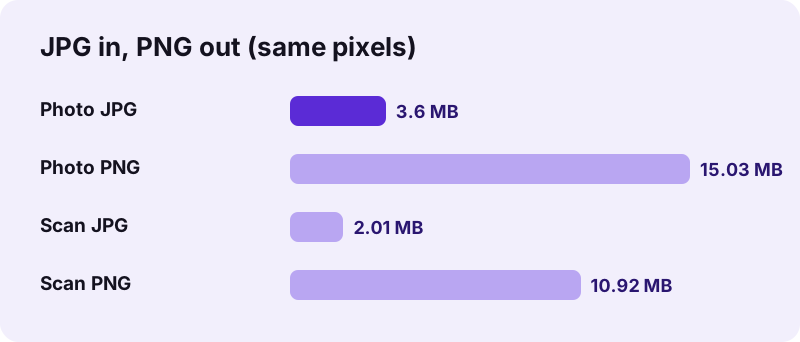
pdf24 JPG to PNG changes only how the pixels are stored. The JPG is decoded once and the result is written as lossless PNG, so the picture looks exactly like the JPG, at the same 3024 × 4032 pixels in our test. What grows is the file: 3.60 MB of JPG became 15.03 MB of PNG.
Converting does not improve quality. Detail removed by JPEG compression when the photo was taken stays removed, and any blocky artefacts stay visible in the PNG. What the PNG gives you is protection from now on: editing and saving it again and again never adds new loss, unlike re-saving a JPG.
“The Joint Photographic Experts Group created the standard in 1992, based on the discrete cosine transform (DCT) algorithm.”
pdf24 JPG to PNG for photo editing
Every save of a JPG compresses it again, so a photo edited and saved ten times slowly degrades. Convert to PNG once, do all the editing in PNG, and export a JPG only at the very end. Retouching, colour correction and adding text all benefit from this order, especially when several people work on the same picture.
pdf24 JPG to PNG before removing a background
JPG has no transparency, so a cut-out product photo cannot be saved as JPG. Convert to PNG first: the file has an alpha channel, fully opaque at the start (every pixel in our output had alpha 255), and keeps the transparent areas you create in an editor or background remover.
pdf24 JPG to PNG for sites that require PNG
App stores, sticker makers, some print-on-demand shops and certain upload forms ask specifically for PNG. A converted file satisfies the requirement; check the size limit too, because PNG files of photos are four to five times larger than the JPG, as our measurements show.
pdf24 JPG to PNG: tip for large photo sets
Three photos of 9.21 MB together became a 41.00 MB ZIP of PNGs in 3.6 s in our test. Convert only the photos you will edit, and keep the JPGs for everything else; for documents, JPG to PDF keeps the photos at their original size.
Why is the PNG so big after pdf24 JPG to PNG?
pdf24 JPG to PNG output is big because PNG compression is lossless and works well only on flat areas, while photos are full of fine texture. JPEG throws much of that away; PNG must keep all of it. Our photo grew 4.2 times, from 3.60 to 15.03 MB, and a document scan 5.4 times.
| Input | JPG size | PNG size | Growth | Time |
|---|---|---|---|---|
| Phone photo, 3024 × 4032 | 3.60 MB | 15.03 MB | 4.2 × | 1.2 s |
| A4 scan, 2480 × 3508 | 2.01 MB | 10.92 MB | 5.4 × | 1.0 s |
| 3 files together | 9.21 MB | 41.00 MB (ZIP) | 4.5 × | 3.6 s |
The PNG converter has no quality setting, because lossless output has nothing to adjust. If you need a smaller file that still opens everywhere, keep the JPG; if you need a modern smaller format, see JPG to WebP.
pdf24 JPG to PNG and photo metadata
The PNG is written from the pixels only, so the JPG's EXIF data, including GPS position, date and camera model, is not copied. That is useful before posting a photo publicly; keep the JPG if you need the metadata.
Is pdf24 JPG to PNG private?
pdf24 JPG to PNG is private because your photos never leave the device. The browser reads them with the File API, decodes them and writes each PNG with its own canvas encoder. The result line confirms 0 bytes uploaded, nothing is stored on a server, and the converter works offline once the page has loaded.
- No account, no watermark, no file limit.
- Several photos come back as one ZIP.
- The other direction: PNG to JPG makes PNG photos small again.
- Closing the tab clears the photos from memory.
pdf24 JPG to PNG on phones and computers
The converter works in Chrome, Edge, Firefox and Safari on every major operating system.
On a computer, drop the photos on the box from a folder or straight from a camera card. On a phone, pick them from the gallery or Files. pdf24 JPG to PNG needs about one second per 12-megapixel photo on a laptop in our test, and longer on a phone. Because the PNGs are large, a phone needs free storage space and memory; convert big batches in smaller groups to avoid the browser running out of memory.
File names stay recognisable: IMG_0042.jpg becomes IMG_0042.png. A batch downloads as one ZIP named after the first photo; unzip it with the tool built into your system.
pdf24 JPG to PNG or keep the JPG?
A quick way to decide: ask what happens to the picture next. If it goes to someone who only looks at it, keep the JPG, which is smaller and opens everywhere. If it goes into an editor, a design file, a background remover or a platform that names PNG in its rules, convert it first. Converting the same JPG twice gives the same PNG, so you lose nothing by trying it and deleting the copy if you do not need it.
pdf24 JPG to PNG: frequently asked questions
Is pdf24 JPG to PNG free?
Yes. pdf24 JPG to PNG on this site costs nothing, needs no account and adds no watermark. Your browser decodes and encodes the photos, so there is no server cost and no daily limit. The only practical limit is the memory and storage of your device, since PNG files are large.
Is pdf24 JPG to PNG made by PDF24?
No. pdf24tools is an independent website and is not affiliated with PDF24 or Geek Software GmbH. We use the search phrase in our titles because people type it, but this converter, its code and the measurements on this page are our own. Your photos are processed only on your device.
Does pdf24 JPG to PNG improve quality?
No. A PNG stores the JPG's pixels exactly, including any compression artefacts already in the photo. Converting cannot restore detail JPEG removed. The benefit is that the PNG never loses anything more, however often you edit and save it, which a JPG cannot promise.
Why is the file so much bigger after pdf24 JPG to PNG?
PNG is lossless, and photos contain fine texture that lossless compression cannot shrink much. Our 3.60 MB photo became 15.03 MB, 4.2 times larger, and an A4 scan grew 5.4 times. That is normal for every JPG to PNG conversion, not a problem with the file.
Does pdf24 JPG to PNG upload my photos?
No. The photos are read with the browser File API and converted on your device. The result line reports 0 bytes uploaded and nothing is stored. After the page has loaded you can switch on airplane mode and the conversion still works exactly the same.
Does pdf24 JPG to PNG make the background transparent?
No. The PNG gets an alpha channel, but every pixel starts fully opaque, because a JPG has no transparency to carry over. Remove the background afterwards in an editor or background remover; the PNG will keep the transparent areas you create.
Does pdf24 JPG to PNG keep the resolution?
Yes. The PNG has exactly the same width and height as the JPG; our 3024 × 4032 photo stayed 3024 × 4032 and our 2480 × 3508 scan stayed 2480 × 3508. Nothing is scaled, sharpened or cropped during the conversion, so the PNG can replace the JPG in any layout without changing its size.
Can pdf24 JPG to PNG convert many photos at once?
Yes. Select all the JPG files together. One photo downloads as a single PNG; two or more come as one ZIP. Our three photos of 9.21 MB produced a 41.00 MB ZIP in 3.6 s. On a phone, convert large batches in smaller groups to save memory.
Does pdf24 JPG to PNG keep EXIF data?
No. The PNG is written from the pixels only, so GPS position, date taken and camera model are not copied from the JPG. This is useful before sharing photos publicly. Keep the original JPG files if you need that information for sorting or records.
Does pdf24 JPG to PNG work on an iPhone?
Yes. Open the page in Safari, tap Choose images and pick the photos from Photos or Files. The PNG downloads through the Safari prompt into Files, from where you can save it to Photos. Make sure the phone has free space, because each PNG photo can exceed 10 MB.
When should I not use pdf24 JPG to PNG?
Skip it when you only want to send, upload or store a photo: the JPG is several times smaller and looks the same. Use PNG when you will edit the photo repeatedly, need transparency later, or a platform demands PNG. For smaller modern files, WebP is the better target.
pdf24 JPG to PNG: sources
- JPEG — Wikipedia
- Portable Network Graphics (PNG) Specification — W3C
- HTMLCanvasElement: toBlob() method — MDN Web Docs