Why is pdf24 not working on my file?
A tool stops for one of a few reasons, and the status line under the button names it: the PDF is password-protected, damaged, of a type the tool does not accept, a scan without text, or too large for the device's memory. A part of the tool not loading because of the connection is the sixth cause.
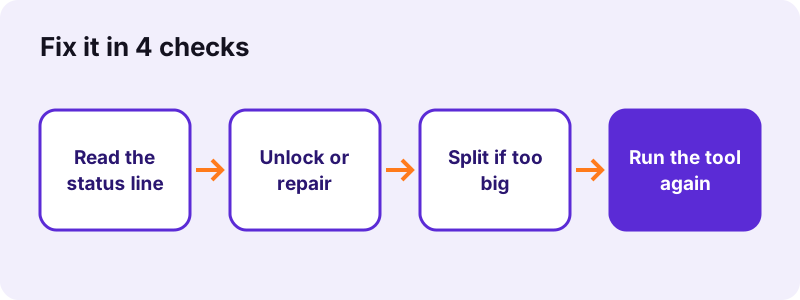
Start with that line every time. In our tests, each case of pdf24 not working on a file came with a plain message, and the table below maps every message to its cause and the tool that fixes it.
| Message (short) | Cause | Fix |
|---|---|---|
| This PDF is password-protected | Open password set | Unlock PDF with your password |
| Could not open this file | Damaged or locked file | Repair PDF |
| file(s) skipped … does not accept that type | Wrong format | Convert the file first |
| No text was found | Scanned PDF | OCR PDF first |
| could not reach … KB | Target too small | Remove pages or split |
| A part of the tool did not load | Connection or blocker | Reload the page |
| No valid pages in that list | Page range outside the file | Check the page numbers |
pdf24 not working with a password-protected PDF
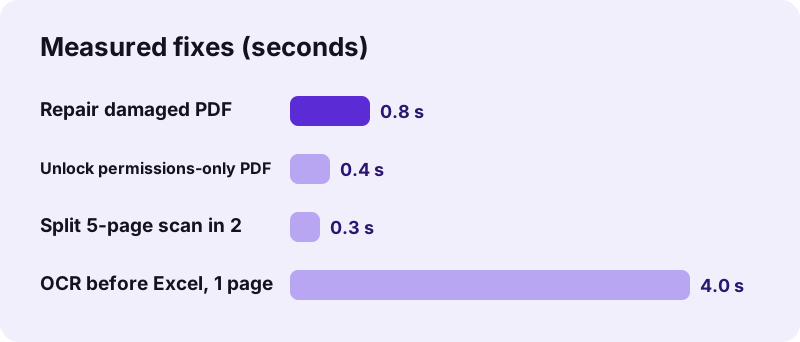
Our locked test file stopped Merge and Compress after 0.3 seconds with the message that it is password-protected. Unlock PDF opens it if you type the password. Files with only print or copy limits unlock without one: ours took 0.4 seconds.
pdf24 not working with a damaged PDF
A file with a broken index cannot be read page by page. Repair PDF rebuilds it with qpdf in WebAssembly; our damaged 2-page test file was rebuilt in 0.8 seconds with its text still selectable. If the damage is worse, readable pages are recovered as images.
pdf24 not working with the wrong file type
Each tool accepts certain formats, listed on its upload box. A Word file dropped on Merge PDF is skipped with a message counting the skipped files. Old binary .ppt files are refused with a hint to save them as .pptx first.
pdf24 not working: check the extension
A file renamed from .jpg to .pdf is still a picture. Use JPG to PDF for it, not a PDF tool.
What to do when pdf24 not working shows no text was found?
The message no text was found means the PDF is a scan: each page is a picture without a text layer, so converting it to Word or Excel has nothing to read. Run OCR PDF first to recognise the words, then convert the OCR copy. Our 5-page contract scan gave 2,575 words.
- Open OCR PDF and choose the scan.
- Pick the document's language (11 are offered).
- Wait: our 4-page scan took 82.2 seconds, including the first data download.
- Convert the -ocr.pdf copy with PDF to Word or PDF to Excel.
“Optical character recognition (OCR) or optical character reader is the electronic or mechanical conversion of images of typed, handwritten or printed text into machine-encoded text.”
OCR is also the fix when search finds nothing in a PDF or when copying text gives only an image. After the OCR run, pypdf could extract the words of our contract scan line by line.
Why is pdf24 not working when the file is very big?
Very large files can fail because all the work happens in your device's memory, not on a server. A phone or an older laptop may run out of memory on long scans or heavy photos. Splitting the file, closing other tabs, or using a computer instead of a phone usually solves it.
Memory is the usual reason for pdf24 not working on long scans, because a page has to be drawn as a large picture before it can be compressed or recognised. A 4-page scan of 8.07 MB still compressed to 770 KB in 14.2 seconds on our laptop.
- Split the file with Split PDF: our 5-page scan split into 2 parts in 0.3 seconds.
- Close other tabs and apps to free memory.
- Compress the parts, then merge them again with Merge PDF.
- Keep the tab in front: some phones pause background tabs.
pdf24 not working: why does the file not save or download?
When the result does not save, the work is usually done but the download is blocked or hidden. Look for the download link under the button, check the browser's download list, and allow downloads for the site if the browser asks. On iPhone, results go to the Downloads folder in the Files app.
Several results arrive as one ZIP file, for example the 6 pages of a split. On a phone, open the ZIP in the Files app to unpack it. If pdf24 not working seems to mean nothing happens at all, wait for the status line: compressing to an exact size took 36 to 107 seconds in our tests.
Why is pdf24 not working with a part that did not load?
The message that a part of the tool did not load means a script or library could not be fetched. Tools load some parts on first use, and OCR also downloads its engine and language data from a public CDN. A dropped connection, a strict firewall or a content blocker can stop that download.
- Reload the page once the connection is back.
- Allow the site in your content blocker, then reload.
- On a work network, ask whether the CDN for OCR data is blocked.
- Update the browser: current Safari, Chrome, Edge and Firefox are supported.
Once loaded, the tool itself sends nothing: every run in our logs showed 0 POST requests, so a firewall that blocks uploads does not affect the processing.
If pdf24 not working persists after a reload, try another browser on the same device. That quickly tells you whether an extension or setting of the first browser is the cause.
pdf24 not working as expected: is the result wrong?
Sometimes the tool works but the result is not what you expected. Text may not be selectable after strong compression, white-out may not remove text, fonts may change in Word to PDF, and a signature is an image, not a certificate. These are stated limits, each with a better tool for the job.
Not every case of pdf24 not working is an error. Read the note under the download link: it states what the tool did and what it could not keep, so you can choose the better tool before sending the file.
| What you see | Why | Use instead |
|---|---|---|
| Text not selectable after compressing | Scans redrawn as JPEG | OCR PDF afterwards |
| Covered text still copyable | White-out only covers | Redact PDF |
| Different font after Word to PDF | Noto Sans replaces fonts | Export from Word itself |
| File still above target | Too many pages for the limit | Remove pages or split |
pdf24 not working: frequently asked questions
Why is pdf24 not working on my phone?
Phones have less memory and slower processors, and all processing happens on the device, which is the most common reason for pdf24 not working on a phone. Large scans may take long or stop. Keep the tab in front, close other apps and split big files. Use a current Safari or Chrome.
Why is pdf24 not working with a locked PDF?
A PDF with an open password cannot be read until it is unlocked. The tool stops with the message that the file is password-protected. Open Unlock PDF, type the password you know and run your tool on the unlocked copy. We do not remove passwords you do not have.
Is pdf24 not working because of my internet?
Only while a tool is loading. Each page and its libraries come from the internet once, and OCR also downloads language data. After that the work runs on your device. If you see that a part did not load, reload the page when the connection is stable.
Why is pdf24 not working on a scanned PDF?
Converting a scan to Word or Excel needs text, and a scan is only pictures. PDF to Excel says no text was found, and PDF to Word places the pages as pictures. Run OCR PDF first: our 5-page scan gave 2,575 recognised words in 75.1 seconds.
Why is my file still big when pdf24 not working on compression?
The fixed levels apply one setting and stop. Choose Exact size and type your limit instead. If even the smallest step cannot reach it, the tool says so and returns its smallest version. Remove pages or split the file, then compress each part.
Why is pdf24 not working in Safari?
Safari supports the tools, but it may ask before allowing downloads from a site, and it can pause background tabs. Allow downloads when asked, keep the tab in front during long jobs and find results in the Downloads folder. Updating to the current iOS or macOS version also helps.
Is pdf24 not working because the file is damaged?
Possibly, if the message says the file could not be opened. Run Repair PDF: it rebuilds the file's structure and, if needed, recovers readable pages as images. Our broken 2-page test file was rebuilt in 0.8 seconds with its text still selectable.
Why is pdf24 not working with Word files?
Word to PDF reads .docx files. Old .doc files go through DOC to PDF, which converts text, breaks and tables only. A password-protected Word file must be opened in Word and saved without the password first. Headers, footers and footnotes are not included in the PDF.
Why is pdf24 not working when nothing happens?
Usually the tool is still busy, so pdf24 not working is only a wait. Look at the status line under the button: it shows progress such as the page being processed. Exact-size compression took up to 106.6 seconds and OCR up to 82.2 seconds in our tests. Wait for the download link.
Does a content blocker cause pdf24 not working?
It can, if it blocks the scripts a tool loads on first use or the CDN that serves OCR data. Allow the site in the blocker and reload. The tools send no files anywhere, so allowing them does not open an upload path for your documents.
Does this pdf24 not working guide cover other products?
We cannot say. pdf24tools is an independent website and is not affiliated with PDF24 or Geek Software GmbH. This guide covers only the messages of our own browser tools. For problems with another product, check that product's own help pages.
Why is pdf24 not working with a page range?
The range lists pages that are not in the file, for example 8-10 in a 6-page PDF. The message then says no valid pages are in the list and how many pages the file has. Use commas and dashes, such as 1-3, 5, and stay within the page count.
Who can I contact if pdf24 not working persists?
Use the contact page linked in the footer and describe the tool, the browser and the exact message you saw. Please do not attach confidential files. Since nothing is uploaded, we cannot see your document, so a short description of the file type and size is the most useful.
More pdf24 not working tools and guides
pdf24 not working: sources
- Optical character recognition — Wikipedia
- WebAssembly — Wikipedia
- File API — MDN Web Docs