What is the verdict of this pdf24 review?
The verdict of our review: the toolbox is fast, free and private for everyday PDF jobs, and honest about its limits. Merging, splitting, compressing and converting worked on every test file with 0 bytes uploaded. The weak points are editing existing text, keeping Word fonts and scanned files that need OCR first.
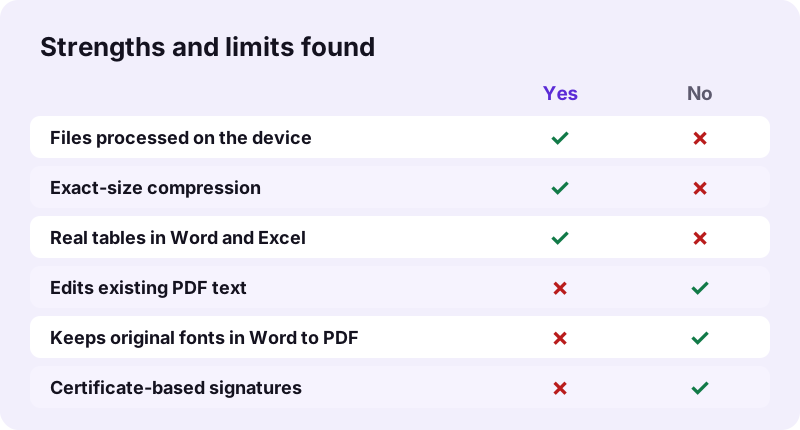
- Best: exact-size compression, real Word and Excel tables, true redaction.
- Good: merge, split and image to PDF, all under 1 second on our files.
- Slow but working: OCR, 75 to 82 seconds for 4 to 5 scanned pages.
- Missing: rewriting existing text, original fonts in Word to PDF, certificate signatures.
In short, this pdf24 review recommends the toolbox for everyday tasks and names a desktop program only for the few jobs a browser cannot do.
pdf24 review: how we tested
We built the site locally, served it, and drove Chrome with Playwright, the way a script clicks through a page. Each run used files from a fixed test set: a 5-page scanned contract, a 4-page scan of 8.07 MB, a 6-page typed PDF, a 2-page invoice, three 12-megapixel photos and a Word report.
pdf24 review: how we checked the outputs
We did not trust the screen alone. Every result was saved and opened with pypdf, openpyxl or a ZIP reader to count pages, extract text, list fonts and read cell values. That is how we found, for example, that white-out leaves the covered word in the file.
pdf24 review: how we logged privacy
The browser's request log was recorded on every run. We counted POST and PUT requests, the ones that could carry a file. The count was 0 in all runs; only GET requests for the page, scripts and OCR language data appeared.
pdf24 review: what we did not test
We did not test every one of the 100+ tools, phones from every maker, or files over 11 MB. Results on a slower phone will take longer than the laptop times in this report.
How fast were the tools in our pdf24 review?
Speed in our review depended on the job. Page-level tools were near instant: merging 15 pages and splitting 6 pages each took 0.2 seconds. Compression of a 5-page scan took 6.6 seconds on Recommended and 36.2 seconds with a 100 KB target. OCR was the slowest at 75.1 seconds for 5 pages.
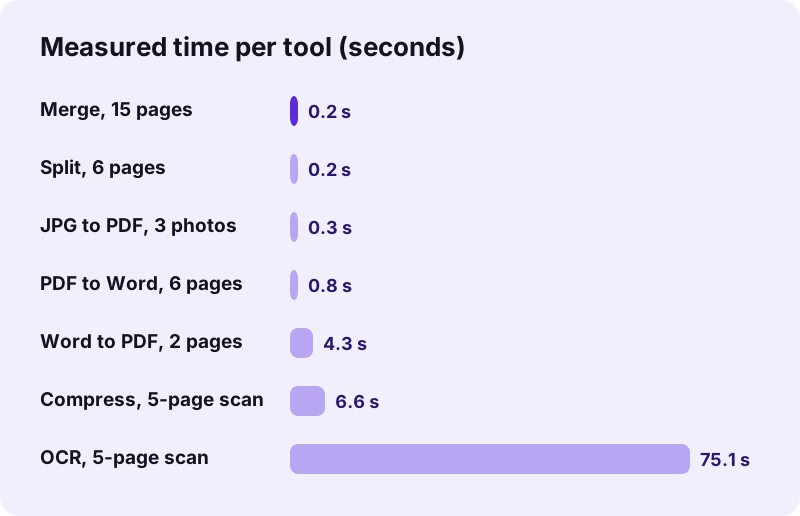
The slow cases are slow because your device does the work. A pdf24 review on a fast desktop will show shorter times; a budget phone will show longer ones. Nothing waits in a server queue, so the time does not depend on how busy the site is.
For long jobs, keep the tab in front and the device awake. Browsers may slow down background tabs to save power, which can stretch an OCR run of a few minutes on a phone. A progress line shows which page is being processed, so you can see that work is still going on.
Which results stood out in this pdf24 review?
Three results stood out in the review. Exact-size compression got a 2.46 MB scan down to 82 KB for a 100 KB limit. PDF to Excel stored invoice prices as real numbers, such as 25.5 and 319.7, not text. Redact PDF left 0 extractable characters on redacted pages instead of just covering them.
| Tool | Test file | Result | Check |
|---|---|---|---|
| Compress PDF | 5-page scan, 2.46 MB | 82 KB at a 100 KB target | 5 pages kept |
| PDF to Excel | 2-page invoice | 26 cells in 0.6 s | numbers are numbers |
| PDF to Word | 2-page invoice | 1 Word table, 6 rows | editable |
| Redact PDF | 6-page text PDF | 240 matches removed | 0 characters left |
| OCR PDF | 5-page contract scan | 2,575 words, 75.1 s | text extractable |
| JPG to PDF | 3 photos, 10.80 MB | 3 pages, 0.3 s | JPEG bytes unchanged |
In each of these rows the pdf24 review checked the output file, not only the message on screen, so the numbers describe what a recipient would actually receive.
What limits did our pdf24 review find?
Our review found five limits, all stated by the tools themselves in their result lines. Edit PDF cannot rewrite existing text, Word to PDF replaces fonts with Noto Sans, scanned PDFs need OCR before conversion, compression turns scans into pictures, and Sign PDF adds a visible image rather than a certificate-based signature.
| Limit | What we saw | Workaround |
|---|---|---|
| Existing text | Edit PDF adds text, images, shapes, white-out | PDF to Word, edit, Word to PDF |
| Fonts | Output fonts were NotoSans subsets only | Export from Word itself for brand fonts |
| Scans | 5 pages placed as pictures in Word | Run OCR PDF first |
| White-out | Covered word still extractable | Use Redact PDF |
| Signatures | Image on the page, 12 KB to 29 KB | Certificate software for legal e-signing |
We count it in favour of this pdf24 review subject that none of these limits was hidden: each appeared as a plain note under the download link, so you know before you send the file.
Is the toolbox in this pdf24 review private?
Yes, privacy was the clearest strength in the review. The browser opens your file with the File API and processes it on the device. Our request logs showed 0 POST requests in every run, and each result line reported 0 bytes uploaded. OCR fetches its engine data from a public CDN, never your document.
“The File API enables web applications to access files and their contents.”
You can repeat this part of the pdf24 review yourself: open the Network tab in your browser's developer tools, run any tool and look for an outgoing request the size of your file. There should be none.
Who should use the tools from this pdf24 review?
Based on our review, the tools suit anyone who needs quick, private PDF jobs without installing software: students merging assignments, applicants compressing scans for portals, small offices converting invoices to Excel, and people redacting documents. Anyone needing certificate signatures, PDF/A archiving or original fonts should add a desktop program.
- Good fit: forms and portals with size limits, everyday merging and splitting, scans to text, invoices to spreadsheets.
- Partial fit: editing PDFs, by adding rather than rewriting text.
- Not a fit: legal digital signatures, PDF/A validation, converting web pages.
For the good-fit cases, this pdf24 review found no reason to pay for a tool. For the rest, combine the browser tools with one specialised program.
pdf24 review: frequently asked questions
Is this pdf24 review independent?
This pdf24 review is our own test of our own toolbox, so read it as a tested report rather than a neutral rating. To keep it useful we list measured numbers, every limit we found and how to repeat the tests yourself. We publish no star rating, because we have not collected any.
What files did the pdf24 review use?
The pdf24 review used a fixed test set: a 5-page scanned contract of 2.46 MB, a 4-page scan of 8.07 MB, a 6-page typed PDF, a 2-page invoice with a table, three 12-megapixel photos, mixed images including HEIC and TIFF, and a 2.01 MB Word report with a picture.
Does the pdf24 review cover phones?
Only partly. Our measured times come from Chrome on a Windows laptop. The tools work the same in phone browsers such as Safari and Chrome, but heavy jobs like OCR or exact-size compression take noticeably longer, because the phone itself does all the processing.
What was the best tool in the pdf24 review?
Exact-size compression was the most useful result in the pdf24 review: you type a limit and the tool steps down until the file fits. Our 2.46 MB scan reached 148 KB for a 200 KB target and 82 KB for a 100 KB target. Fixed levels alone left it at 244 KB or more.
What was the weakest point in the pdf24 review?
Editing existing text. Edit PDF adds new text, images, highlights, shapes and white-out, but it does not change the words already in the file. The workaround is PDF to Word, editing there, then Word to PDF, which replaces the original fonts with Noto Sans.
Does the pdf24 review recommend it for scans?
Yes, with one step added. Compression handles scans very well: 8.07 MB became 770 KB on Recommended. For editing or searching, run OCR PDF first; our 5-page contract gave 2,575 recognised words in 75.1 seconds. Without OCR, PDF to Word places scanned pages as pictures.
Is everything in the pdf24 review free?
Yes. Every tool in the pdf24 review was free, without sign-up, watermark or file-count limit. Our largest test, three files of 10.54 MB merged into 15 pages, ran without any prompt or paywall. Processing happens on your device, so there is no per-file server cost.
How private was the toolbox in the pdf24 review?
Fully local in our logs. Every run showed 0 POST or PUT requests, and each result line said 0 bytes uploaded. The only downloads were the page, its scripts and, for OCR, the Tesseract engine and language data from a public CDN. Your file stays on the device.
Does the pdf24 review rate other products?
No. pdf24tools is an independent website and is not affiliated with PDF24 or Geek Software GmbH. This review covers only our own browser tools, tested on 2 November 2026. We make no claims about any other product's features, speed or privacy.
Did the pdf24 review find any errors?
Only expected ones. In the pdf24 review a file with an open password stopped with a clear message asking for the password, and PDF to Excel on a scan said no text was found and suggested OCR. A damaged test file was rebuilt by Repair PDF in 0.8 seconds.
How does Word to PDF do in the pdf24 review?
It produced real, selectable text: our 2.01 MB report became a 2-page PDF in 4.3 seconds. The original fonts were replaced by Noto Sans, and headers, footers and footnotes were left out, as the result line says. Hyperlinks look blue and underlined but are not clickable.
Is the pdf24 review result the same on Mac and Linux?
The output should be the same, because the same code runs in every browser. Times depend on the computer, not the system. Safari, Chrome, Edge and Firefox all run the tools; we measured in Chrome, so other browsers may be a little faster or slower.
Will this pdf24 review be updated?
Yes, when the tools change in a way that affects the results. The date at the top shows the last update of this pdf24 review, and each table states the test date. If a measured number changes, we rerun the same test files and replace it rather than estimating.
More pdf24 review tools and guides
pdf24 review: sources
- File API — MDN Web Docs
- Optical character recognition — Wikipedia
- PDF — Wikipedia