How do you pdf24 compress PDF to 100KB step by step?
To compress a PDF to 100 KB, open the Compress PDF tool, choose the file, select Exact size, type 100 in the KB box and press Compress PDF. The tool lowers image resolution step by step until the file fits, then shows the final size, for example 82 KB from 2.46 MB.
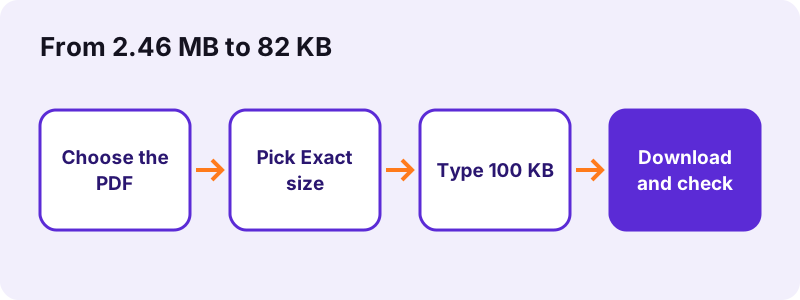
- Open Compress PDF or the ready-made 100 KB page, which pre-selects the target.
- Tap Choose PDF files and pick the document from your phone or computer.
- Select Exact size and type
100in the KB box (the field accepts 20 to 20,000). - Press Compress PDF and wait; our 5-page scan took 36 seconds.
- Read the result line, open the -compressed.pdf file and check that every page is readable.
pdf24 compress PDF to 100KB: what the exact size option does
The exact size option first saves the file losslessly. If that copy is still above 100 KB, it redraws every page as a JPEG picture and walks down a ladder of 10 settings, from 150 % resolution at quality 0.8 to 35 % at quality 0.16. It stops at the first setting that fits, so you get the sharpest version under the limit, not the smallest possible one.
pdf24 compress PDF to 100KB with several files at once
You can add more than one PDF. Each file is compressed on its own to the same target and the results download together as a ZIP. The limit applies per file, so three files of 100 KB make a 300 KB ZIP, which matters if a portal counts the total of all attachments.
pdf24 compress PDF to 100KB: time per page
Time grows with page count and pixel size. Our 5-page contract scan needed 36.2 seconds and the 4-page, 8.07 MB scan needed 106.6 seconds, because the ladder had to go further down. A typed 6-page PDF finished in about 1 second, since it was already 5.1 KB.
pdf24 compress PDF to 100KB: tip before you start
Remove pages the portal does not need before compressing. Every page you drop gives the remaining pages more of the 100 KB budget, so they stay sharper. Use Remove PDF pages first, then compress the shorter file.
What sizes did pdf24 compress PDF to 100KB reach in our tests?
In our tests the compressed files met the 100 KB target on both scans: a 5-page, 2.46 MB contract scan dropped to 82 KB (97 % smaller) and a 4-page, 8.07 MB scan dropped to 91 KB (99 % smaller). The fixed Recommended level gave 493 KB and 770 KB, far above the limit.
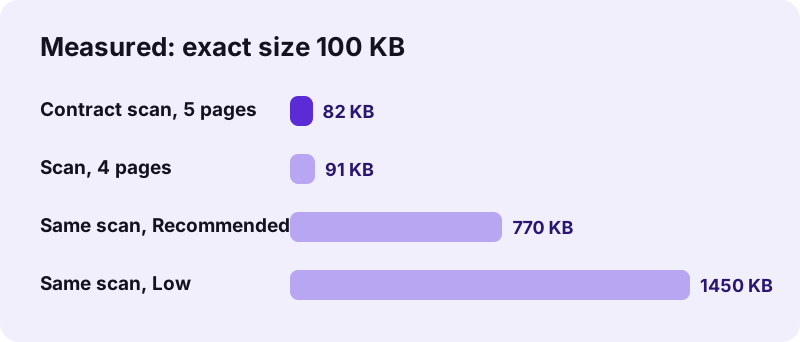
| Test file | Setting | Result | Time |
|---|---|---|---|
| Contract scan, 5 pages, 2.46 MB | Exact size 100 KB | 82 KB | 36.2 s |
| Contract scan, 5 pages, 2.46 MB | Exact size 200 KB | 148 KB | 35.1 s |
| Contract scan, 5 pages, 2.46 MB | Extreme | 244 KB | 3.5 s |
| Scan, 4 pages, 8.07 MB | Exact size 100 KB | 91 KB | 106.6 s |
| Scan, 4 pages, 8.07 MB | Recommended | 770 KB | 14.2 s |
| Typed text, 6 pages, 5.1 KB | any level | 4.2 KB | 1.2 s |
The table shows why the fixed levels are not enough for a hard limit: even Extreme left the contract at 244 KB. To pdf24 compress PDF to 100KB reliably, use the exact size ladder, which keeps going until the number you typed is reached.
Why does pdf24 compress PDF to 100KB sometimes miss the target?
A file misses 100 KB when its pages still look unreadable at the lowest ladder step, or when it contains many pages. The compressor then returns the smallest version it made and says it could not reach the limit. Long scans, colour photos and pages over A4 size are the usual causes.
- Too many pages: 100 KB over 20 scanned pages leaves about 5 KB per page, which is not enough for a readable scan.
- Colour photos: a full-page photo carries far more detail than black text on white paper.
- Very large pages: posters or A3 drawings have more pixels to store at the same resolution.
- Already tiny text PDFs: these are kept as they are, because rasterising them would make them bigger.
When that happens, split the document with Split PDF and send it in two parts, then run pdf24 compress PDF to 100KB on each part, or ask whether the portal accepts a second upload.
pdf24 compress PDF to 100KB for text files versus scans
Scans and typed PDFs react very differently. A scan is one picture per page, so lowering the resolution shrinks it a lot. A typed PDF stores letters as text and fonts, which are already compact: our 6-page text file was only 5.1 KB, and the lossless re-save cut it by 18 % with no visible change.
There is one trade-off with scans: once pages are redrawn as pictures, any text layer is gone. Run OCR PDF on the small file afterwards if the portal or the reader needs searchable text, and check that the OCR copy is still under 100 KB.
“Higher degrees of approximation create coarser images as more details are removed.”
Is pdf24 compress PDF to 100KB safe for passports and payslips?
Compressing an ID scan or payslip here is safe because the file is never sent anywhere. The browser reads it with the File API and all the work runs on your device; our request log showed 0 POST requests and the result line reported 0 bytes uploaded. Closing the tab removes the file from memory.
That matters for application portals that ask for passports, bank statements or medical letters under 100 KB. You can pdf24 compress PDF to 100KB without an account, and nothing is stored on a server, so there is nothing to delete later. See the File API documentation on MDN for how browsers open local files.
pdf24 compress PDF to 100KB on iPhone, Android and Windows
The tool works the same in Safari, Chrome, Edge and Firefox on phones and computers, because it is a web page and not an app. On a phone, pick the PDF from Files or Downloads; the processing is slower than on a laptop, so keep the screen on until the result appears.
| Device | Where to find the PDF | Where the result goes |
|---|---|---|
| iPhone / iPad | Files app, Choose File | Downloads folder in Files |
| Android | Files or Downloads | Downloads |
| Windows / Mac / Linux | File dialog or drag and drop | Your browser's download folder |
What can you do when pdf24 compress PDF to 100KB is still too big?
When the compressed PDF is still above 100 KB, cut content rather than quality. Remove blank or duplicate pages, crop wide white borders, convert colour scans to greyscale, or split the file. Each of these frees bytes for the pages that matter, so the next run reaches the target at a readable quality.
- Convert PDF to grayscale for colour scans of black-and-white documents.
- Crop PDF to cut empty margins around a scanned page.
- Compress PDF to 200 KB if the portal allows a bit more.
pdf24 compress PDF to 100kb: frequently asked questions
Is pdf24 compress PDF to 100KB free?
Yes. You can pdf24 compress PDF to 100KB on pdf24tools at no cost: there is no account, no watermark and no daily limit on files. The work runs inside your browser on your own device, so there is no server cost to charge for. Repeat the run as often as you like.
Does pdf24 compress PDF to 100KB keep text selectable?
Only when the file is already small. A typed PDF under 100 KB is re-saved losslessly and keeps its text. To reach 100 KB, scanned or image-heavy pages are redrawn as JPEG pictures, so any text layer on those pages is lost. Run OCR PDF afterwards if you need searchable text again.
How long does pdf24 compress PDF to 100KB take?
It depends on pages and pixels. In our tests a 5-page, 2.46 MB scan took 36.2 seconds and a 4-page, 8.07 MB scan took 106.6 seconds on a Windows laptop in Chrome. A small typed PDF finished in about 1 second. Phones are slower, so leave the tab open until the download link shows.
Can pdf24 compress PDF to 100KB handle a 20-page scan?
It will try, but 100 KB over 20 scanned pages is about 5 KB per page, which is often too little for readable text. If the result line says the target was missed, remove pages you do not need or split the document into two uploads of 10 pages each.
Why is my file still 300 KB after pdf24 compress PDF to 100KB?
You probably used a fixed level such as Recommended or Extreme. Those levels apply one setting and stop, which left our contract scan at 493 KB and 244 KB. Select Exact size and type 100 instead: the tool then keeps stepping down until the file fits or the pages would become unreadable.
Is my document uploaded when I use pdf24 compress PDF to 100KB?
No. The file is opened by your browser with the File API and processed in JavaScript on your device. Our request log for every test showed no POST request, and the result line states 0 bytes uploaded. That makes the method suitable for passports, payslips, contracts and medical letters.
Does pdf24 compress PDF to 100KB work on iPhone?
Yes. Open the page in Safari or Chrome, tap Choose PDF files, pick the document in the Files app and select Exact size with 100 KB. The result is saved to the Downloads folder in Files. Large scans take longer on a phone, so keep the screen on while it works.
Will pdf24 compress PDF to 100KB make my scan blurry?
It makes the scan as sharp as the limit allows. The ladder starts at high resolution and only goes down when the file is still too big, so a 1-page scan stays clearer than a 5-page one at the same 100 KB. Zoom to 100 % and read the smallest print before you submit.
Can pdf24 compress PDF to 100KB compress a password-protected PDF?
Not while it is locked. A PDF that needs a password to open stops with the message that it is password-protected. Remove the password first with Unlock PDF, using the password you know, then compress the unlocked copy. Protect it again afterwards if the portal accepts encrypted files.
What is the smallest size pdf24 compress PDF to 100KB accepts?
The exact size box accepts values from 20 KB up to 20,000 KB, so you can also aim for 50 KB or 2 MB with the same steps. Very low targets only work for one or two pages; below roughly 20 KB per scanned page most text becomes hard to read.
Does pdf24 compress PDF to 100KB add a watermark?
No. The output contains only your pages, with no logo, stamp or extra page. The file name gets the ending -compressed.pdf so you can tell it apart from the original, which stays unchanged on your device. You can rename the file before uploading it to a portal.
Is pdf24 compress PDF to 100KB an official tool?
No. pdf24tools is an independent website and is not affiliated with PDF24 or Geek Software GmbH. Our tools are separate code that runs in your browser. The results quoted in this guide are our own measurements from 2 November 2026, made with our test files.
Can pdf24 compress PDF to 100KB work offline?
The page has to load once from the internet, together with the PDF libraries it fetches when you first use it. After that the compression itself runs on your device and sends nothing, but if the connection drops before the libraries have loaded, reload the page once you are back online.
More pdf24 compress PDF to 100kb tools and guides
pdf24 compress PDF to 100kb: sources
- Lossy compression — Wikipedia
- File API — MDN Web Docs
- PDF (Portable Document Format) Family — Library of Congress