Are pdf24 free tools really free to use?
Yes. Every tool on pdf24tools is free to use: merge, split, compress, convert, edit, sign, OCR and the rest. There is no paid tier, no trial that expires, no watermark on the result and no sign-up. We ran large files through them, up to 10.80 MB, without hitting any paywall or limit.
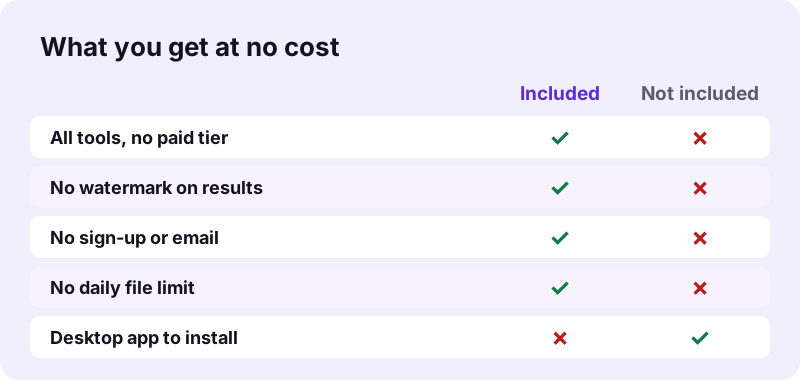
Free here means the full tool, not a demo. A pdf24 free run gives the same output a paid product would label premium: exact-size compression, OCR in 11 languages, real Word tables, and redaction that removes the text.
pdf24 free with no watermark
No logo, stamp or extra page is added to any result. Our signed form, merged files and converted documents contained only our own pages. The file name gets a clear ending such as -compressed.pdf, which you can rename.
The original file is never changed either. Each tool works on a copy in memory and hands you a new file, so you can run the same document through several tools, or the same tool with different options, as often as you need.
pdf24 free without sign-up or email
No tool asks for an email address, a login or a card. That also means no newsletter, no account to delete later and no stored file history. You open the page and start working.
pdf24 free with no file limit
There is no daily count of files and no size cap set by us. The real limit is the memory of your device: a phone can struggle with a 200-page scan that a laptop handles easily. Split very large files if a run stops.
pdf24 free: tip for batches
Tools such as Compress PDF accept many files at once and return them as one ZIP, so you do not have to repeat the steps for each document.
Why can pdf24 free tools cost nothing?
The tools can be free because your own device does the work. Files are processed in the browser with JavaScript and WebAssembly, so there are no servers that receive, convert and store each document. Without a per-file server cost, there is nothing to charge per file, page or conversion.
An upload-based service pays for bandwidth, processing time and storage on every file, which is why such services often limit free use. With a pdf24 free browser tool the file never travels, so a 10.54 MB merge costs the site the same as a 5 KB one: only the page itself is served.
“Freeware is software, often proprietary, that is distributed at no monetary cost to the end user.”
This also explains why pdf24 free use has no daily cap. A cap protects servers from overload; when each visitor's own device does the processing, one heavy user cannot slow anyone else down, so there is nothing to ration.
What did we measure in pdf24 free test runs?
We ran nine free tools on real test files on 2 November 2026 and paid nothing for any of them. Merging 15 pages took 0.2 seconds, compressing a 5-page scan cut it by 80 % in 6.6 seconds, and OCR recognised 2,575 words on a 5-page contract scan. No run showed a watermark or limit.
| Tool | Test | Result | Cost |
|---|---|---|---|
| Merge PDF | 3 files, 10.54 MB | 15 pages, 0.2 s | 0 |
| Compress PDF | 5-page scan, 2.46 MB | 493 KB, 6.6 s | 0 |
| OCR PDF | 5-page scan | 2,575 words, 75.1 s | 0 |
| PDF to Word | invoice, 2 pages | real Word table, 0.8 s | 0 |
| PDF to Excel | invoice, 2 pages | 26 cells, 0.6 s | 0 |
| Sign PDF | 1-page form | signed in 0.2 s | 0 |
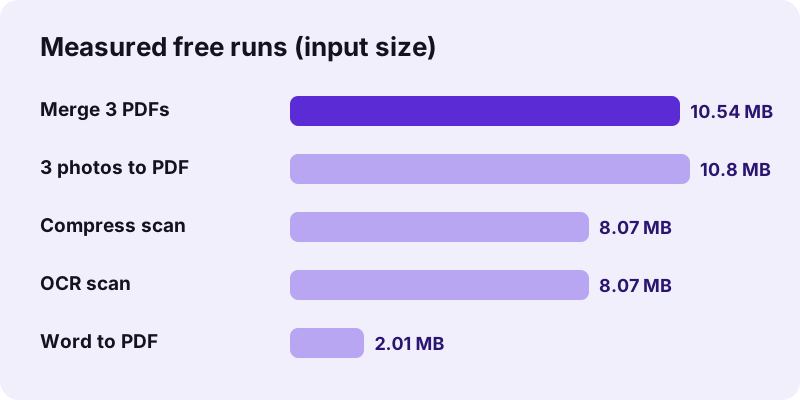
Every pdf24 free result above was checked after download: page counts matched, text stayed selectable where the tool keeps it, and the Excel file held real numbers such as 25.5 and 319.7, not text. Free did not mean a reduced version of the output.
pdf24 free: what is not included?
A few things are not offered, and none of them is a paid extra hidden behind the free tools. There is no desktop program to install, no cloud storage of your files, and no certificate-based digital signature. Heavy server jobs, such as converting web pages or validating PDF/A, cannot run in a browser.
- No install: everything runs in the browser tab; nothing is downloaded to your system.
- No cloud history: results go only to your download folder.
- No certificate signatures: Sign PDF places a visible signature image.
- Honest format limits: Word to PDF uses Noto Sans fonts; scans need OCR before PDF to Word.
These are technical limits, not upsells. A pdf24 free tool that cannot do something says so in its result line instead of asking you to upgrade.
If you need one of these features, use a pdf24 free tool for the rest of the job and a dedicated program only for that step, for example certificate signing software that holds your own digital ID.
Is pdf24 free also private and safe?
Free and private go together here: because the file is processed on your device, nobody pays for or sees a copy on a server. Our request logs for every free run showed 0 POST requests and the result line said 0 bytes uploaded. A free tool that uploads files would need to fund that traffic somehow.
When you compare any pdf24 free offer with others, ask two questions: does the file leave my device, and what happens to it afterwards? Here the answers are no and nothing. The File API on MDN explains how a page can read a file without sending it.
The same applies on phones: a pdf24 free page in Safari or Chrome follows the browser's sandbox rules and can only read the files you choose in the picker, nothing else on the device.
How do you start with pdf24 free tools today?
Starting with the free tools takes one click: open the tool you need, choose your file and press the action button. There is nothing to register or install, so the first result is usually ready within seconds. For a scan you plan to email, Compress PDF on Recommended is a good first try.
- Open Compress PDF, Merge PDF or any other tool.
- Choose the file from your device.
- Keep the default options or change them.
- Press the button and download the result.
Bookmark the tools you use often. Since a pdf24 free page keeps no account, the bookmark is the fastest way back.
pdf24 free: frequently asked questions
Is pdf24 free for commercial use?
Yes, you can use the tools for work files at no cost. There is no business tier and no licence key. Because files are processed on your own device, client documents are not sent to a server. Check your company policy on web tools before using them for confidential files.
Why is pdf24 free when other tools charge?
Your own phone or computer does the processing, so there is no server cost for each file. Upload-based services pay for transfer, conversion and storage of every document. With pdf24 free browser tools a 10 MB merge and a 5 KB merge cost the site the same: just the page.
Does pdf24 free add a watermark?
No. Results contain only your pages, with no logo, stamp or extra page. We checked merged, signed, compressed and converted files from our tests and found nothing added. Only the file name changes, for example to -compressed.pdf or -signed.pdf, and you can rename it.
Is there a file size limit in pdf24 free tools?
We set no size or file-count limit. The limit is your device's memory: our laptop handled 10.80 MB of photos in 0.3 seconds, while a phone may need more time or fail on a very large scan. Split huge files and process them in parts if a run stops.
Do I need an account for pdf24 free tools?
No. No tool asks for an email, login or payment. You open a page and use it. The downside is that there is no file history: the site never has your file, so keep the downloaded result yourself, for example in a cloud folder you trust.
Is pdf24 free OCR limited?
No. OCR PDF is free in all 11 languages it offers, with no page limit. It is slower than other tools because recognition runs on your device: our 4-page scan took 82.2 seconds, including the first download of the English language data from a public CDN.
Is pdf24 free on iPhone and Android?
Yes. The tools work in Safari, Chrome and other phone browsers at no cost and with no app to install. Pick the file from Files or Downloads, run the tool and the result is saved to your phone's download folder. Large scans simply take longer than on a computer.
Will pdf24 free tools stay free?
The design keeps the cost per file at zero, because processing happens on your device and not on our servers. That is the reason the tools can be free without limits. We cannot promise the future of any website, but there is no per-file cost that would push us to charge.
Does pdf24 free include a desktop app?
No. There is no program to download or install, on Windows, Mac or Linux. Every tool runs in the browser, which also means nothing on your computer needs updating. If a page offers you a download claiming to be our desktop app, it is not from pdf24tools.
Is pdf24 free here an official tool?
No. pdf24tools is an independent website and is not affiliated with PDF24 or Geek Software GmbH. Our tools are our own code running in your browser. This guide describes only what pdf24tools offers and what we measured on 2 November 2026.
Is pdf24 free compression as good as paid tools?
It covers the common needs: fixed levels and an exact target size. In our tests a 2.46 MB scan reached 493 KB on Recommended and 82 KB with a 100 KB target. Typed PDFs only shrink a little, 18 % on our 6-page file, because they are already compact.
Can I use pdf24 free tools without internet?
Each page and its libraries must load once from the internet. After that the work runs on your device and sends nothing, so a dropped connection during a run does not matter. OCR needs its language data downloaded first. There is no offline app.
Are pdf24 free results lower quality?
No. pdf24 free results match what paid tools built on the same methods give: lossless merging, exact page copies when splitting, and original JPEG bytes when converting photos to PDF. Lower quality only happens when you choose it, for example a strong compression level such as Extreme.
More pdf24 free tools and guides
pdf24 free: sources
- Freeware — Wikipedia
- File API — MDN Web Docs
- Web application — Wikipedia