How do you pdf24 compress PDF for email in four steps?
To compress a PDF for email, open Compress PDF, choose the file, keep the Recommended level and press Compress PDF. Download the -compressed.pdf copy and attach that file instead of the original. Recommended is tuned for email: in our test it cut a 10.54 MB attachment to 1.85 MB.
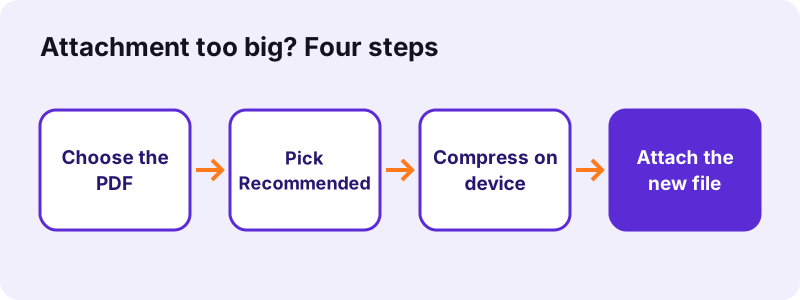
- Open Compress PDF in any browser.
- Tap Choose PDF files or drag the attachment onto the box; several files are fine.
- Keep Recommended, or pick Exact size and type the limit your mail service sets.
- Press Compress PDF and wait for the result line, such as "82% smaller: 10.54 MB → 1.85 MB".
- Save the file, then attach the new copy in your mail app.
pdf24 compress PDF for email: Recommended or exact size?
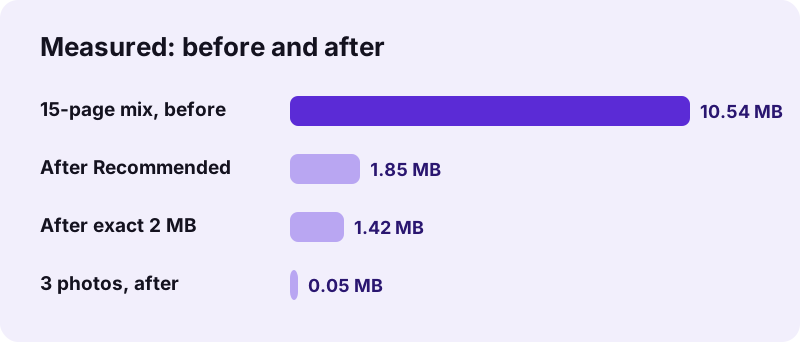
Recommended applies one balanced setting and is the fastest choice. Exact size keeps stepping down until the file is under the number you type, which suits a known limit. For our 15-page file, an exact target of 2,000 KB gave 1.42 MB in 38.9 seconds, against 1.85 MB in 13.3 seconds for Recommended.
pdf24 compress PDF for email with several attachments
Add all the files you want to send in one go. Each PDF is compressed separately and the results arrive together in a ZIP. Attach the single PDFs rather than the ZIP when the recipient reads mail on a phone, because some mail apps do not open archives.
pdf24 compress PDF for email: count the total
Mail limits apply to the whole message, not to each file. Three attachments of 9 MB make 27 MB together and can bounce even though each one looks small. Add up the sizes shown on the result line before you press Send.
pdf24 compress PDF for email: quick check before sending
Open the compressed copy and zoom to 100 % on the page with the smallest print, such as a signature line or a table. If it is readable on screen it will be readable for the recipient, because they get exactly the same file.
How small should a file be for pdf24 compress PDF for email?
Email size limits depend on the provider. Gmail, for example, lets personal accounts attach up to 25 MB per message, and attachments are encoded for sending, which adds about a third to their size. Aiming for 10 MB or less in total is a safe margin for most company and personal mailboxes.
Google states the 25 MB rule on its Gmail attachment help page. A file that is 20 MB on your disk can therefore already be too big once it is encoded. When in doubt, pdf24 compress PDF for email with exact size set to 9,000 KB and the message will pass almost everywhere.
“An email attachment is a computer file sent along with an email message.”
What results did pdf24 compress PDF for email give in our tests?
Our email compression tests on 2 November 2026 covered four kinds of attachment. Scans and photos shrank the most: three phone photos in a 10.80 MB PDF became 52 KB, and a 4-page, 8.07 MB scan became 770 KB. A typed 6-page PDF only lost 18 %, because it was already tiny.
| Attachment | Before | After | Time |
|---|---|---|---|
| 15 pages, text + 2 scans | 10.54 MB | 1.85 MB | 13.3 s |
| Same, exact size 2,000 KB | 10.54 MB | 1.42 MB | 38.9 s |
| 3 phone photos on A4 | 10.80 MB | 52 KB | 11.0 s |
| 4-page scan | 8.07 MB | 770 KB | 14.2 s |
| 5-page contract scan | 2.46 MB | 493 KB | 6.6 s |
| 6 pages of typed text | 5.1 KB | 4.2 KB | 1.2 s |
The pattern is simple: the more of a PDF is pictures, the more it shrinks. Before you pdf24 compress PDF for email, look at what the attachment contains. A file of scans or photos can usually drop by 80 to 99 %, while a file of typed text and vector charts stays almost the same size and is rarely the reason a message bounces.
pdf24 compress PDF for email without losing readability
Readability holds best when you compress only as far as the mail limit requires. Use Low for documents the recipient will print, Recommended for normal reading, and Extreme only for scans that must become very small. Each step lowers the resolution of page pictures, which can soften fine print.
- Low: keeps pages sharp; our 2.46 MB scan became 1,015 KB (60 % smaller).
- Recommended: 493 KB for the same scan (80 % smaller).
- Extreme: 244 KB (90 % smaller), with visibly softer edges.
- Exact size: as sharp as your typed limit allows.
Note that scanned or photo pages are redrawn as JPEG pictures, so text on those pages is no longer selectable. If the recipient must search or copy, run OCR PDF on the compressed copy. Typed PDFs keep their text whenever you pdf24 compress PDF for email and the lossless copy is the smallest.
Is it safe to pdf24 compress PDF for email with private data?
Compressing a private attachment here is safe because the PDF stays on your device. The browser opens it with the File API, the compression runs in JavaScript, and our request log showed no POST request during any test. Nothing is stored, so invoices, payslips and medical letters are never handed to a server.
The only network traffic is the page itself and the PDF libraries it loads. The email is then sent by your own mail provider, exactly as it would be without compression. For extra protection, add a password with Lock PDF and send the password by another channel.
pdf24 compress PDF for email on a phone
Phone users can compress the attachment in Safari or Chrome without installing an app. Pick the PDF from Files or Downloads, compress it, then share the new copy to Mail or Gmail from the download list. A phone takes longer than a laptop, so keep the screen on until the result appears.
| Phone | Pick the PDF from | Attach it from |
|---|---|---|
| iPhone | Files app | Files → Downloads → Share → Mail |
| Android | Files or Downloads | Downloads → Share → Gmail |
What if the mail still bounces after pdf24 compress PDF for email?
An email that still bounces after compression usually has too many attachments or too many scanned pages. Split the PDF with Split PDF and send two messages, remove pages the recipient does not need, or convert colour scans to greyscale. Each step frees space, so the next compression run fits the limit.
- Split PDF into two halves and send them separately.
- Remove PDF pages such as blank backs of scanned sheets.
- Convert PDF to grayscale before compressing a colour scan.
- Compress PDF to 10 MB for a fixed safe target.
pdf24 compress PDF for email: frequently asked questions
Is pdf24 compress PDF for email free?
Yes. You can pdf24 compress PDF for email on pdf24tools at no cost: there is no account, no watermark and no limit on how many files you shrink per day. All the work happens on your own device in the browser, so there are no server costs and no paid tier for bigger files.
Which level should I pick for pdf24 compress PDF for email?
Start with Recommended. It is designed for email and cut our 15-page, 10.54 MB test file to 1.85 MB. If your provider sets a specific limit, choose Exact size and type that number in KB. Pick Low only when the recipient will print the document and the size already fits.
Does pdf24 compress PDF for email upload my attachment?
No. The PDF is read by your browser and processed on your device; the result line says 0 bytes uploaded, and our request log confirmed that no file data was sent. The attachment only travels when you send the email through your own provider.
How long does pdf24 compress PDF for email take?
Small files take about a second. In our tests a 2.46 MB scan needed 6.6 seconds, a 10.54 MB file with 15 pages needed 13.3 seconds, and an exact target of 2,000 KB needed 38.9 seconds because several settings were tried. Phones are slower than laptops.
Why did pdf24 compress PDF for email barely shrink my file?
Your PDF is probably typed text with no pictures. Text and fonts are already compact, so only a lossless re-save is possible: our 6-page text file went from 5.1 KB to 4.2 KB. Such files rarely cause bounces; check whether another attachment in the message is the large one.
Can pdf24 compress PDF for email keep the text searchable?
Typed PDFs keep their text when the lossless copy is the smallest. Scanned or photo pages are redrawn as JPEG pictures to save space, so their text cannot be selected. Run OCR PDF on the compressed copy afterwards if the recipient needs to search or copy words.
Can pdf24 compress PDF for email handle many attachments at once?
Yes. Add several PDFs together; each one is compressed on its own and the results download in one ZIP. Remember that mail limits count the whole message, so add up the new sizes before attaching them all to a single email.
Does pdf24 compress PDF for email work in Outlook or Gmail?
The tool runs in your browser, separate from the mail program, so it works with any provider. Compress the PDF first, save the copy, then attach it in Outlook, Gmail, Apple Mail or any other app. The compressed file is a normal PDF that every mail client accepts.
Will the recipient notice pdf24 compress PDF for email?
Only if you compress further than needed. At Recommended, typed text looks unchanged and scans stay readable on screen. Extreme can soften small print on scans. Open the copy at 100 % zoom before sending; the recipient sees exactly what you see.
Can pdf24 compress PDF for email shrink a password-protected file?
Not while it is locked. A PDF that needs a password to open stops with a message asking you to remove the protection first. Unlock it with Unlock PDF using the password you know, compress the copy, then protect it again with Lock PDF before sending.
Who makes pdf24 compress PDF for email?
No. pdf24tools is an independent website, not affiliated with PDF24 or Geek Software GmbH. Our compressor is separate code that runs in your browser, and every size in this guide comes from our own tests with our own sample files on 2 November 2026.
What is the safest target for pdf24 compress PDF for email?
A total of about 10 MB per message passes most mailboxes, because providers often allow 20 to 25 MB and encoding adds about a third. Choose Exact size and type 9000 for one large attachment, or split the document if it is a long scan.
Does pdf24 compress PDF for email change my original file?
No. The original stays untouched on your device. The tool creates a new file with -compressed.pdf at the end of its name, so you always keep the full-quality version for printing or archiving and send only the smaller copy.
More pdf24 compress PDF for email tools and guides
pdf24 compress PDF for email: sources
- Gmail: attachment size limit — Google Gmail Help
- Email attachment — Wikipedia
- File API — MDN Web Docs