Can you really pdf24 compress without losing quality?
Compressing without losing quality is possible only for the part of a PDF that can be stored more efficiently. The tool always tries a lossless re-save first, which keeps every letter and picture as it was. Bigger savings need lower-resolution page pictures, and that step is lossy by definition.
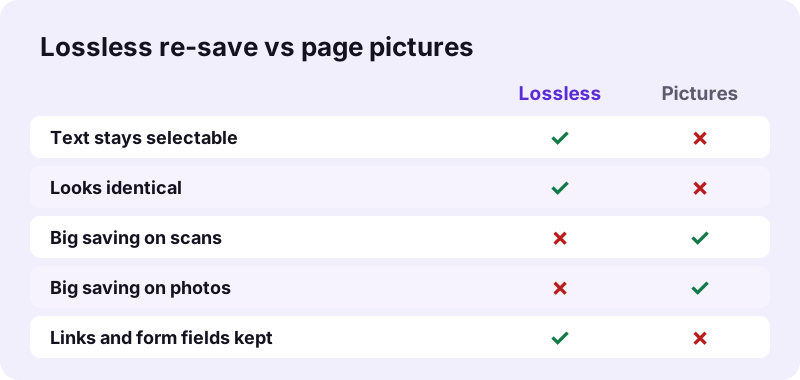
The compressor makes both versions and keeps whichever is smaller; if neither beats the original, you get the original back with a note. So the honest question is not which button is lossless, but whether your file is mostly text or mostly pictures.
“Lossless compression is possible because most real-world data exhibits statistical redundancy.”
pdf24 compress without losing quality on typed documents
Typed PDFs from Word, a browser or an invoicing program store letters as text. The lossless copy usually wins for them: our 6-page text file went from 5.1 KB to 4.2 KB and a 2-page invoice from 2.4 KB to 1.8 KB. Both kept every character selectable and looked identical.
pdf24 compress without losing quality on scans and photos
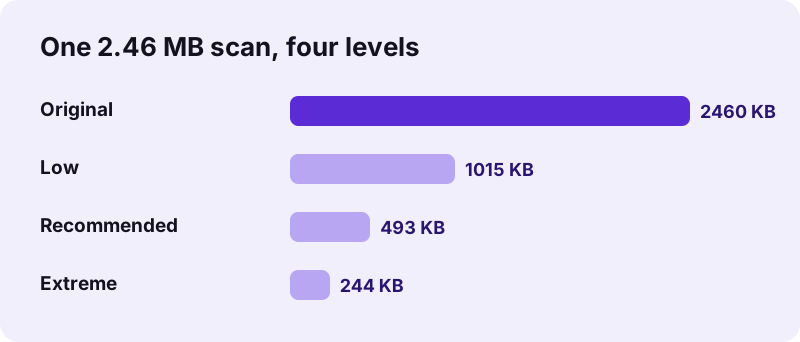
A scan is already a picture of a page. Saving it at lower resolution is the only way to make it much smaller, so some detail goes. At the Low level our 5-page scan dropped from 2.46 MB to 1,015 KB, and the text stayed easy to read on screen and in print.
pdf24 compress without losing quality on mixed files
Watch out for typed files that contain one large photo. Our 2-page Word export of 2.05 MB shrank to 136 KB at Low, but both pages became pictures, so its 652 selectable characters on page 1 dropped to 0. Look at the result before replacing the original.
pdf24 compress without losing quality: the 10-second check
Open the compressed copy, press Ctrl+F (Cmd+F on a Mac) and search for a word on page 1. If the search finds it, the text layer survived. If not, the pages are pictures; keep the original as well, or run OCR PDF on the copy.
Which level keeps the best quality in pdf24 compress without losing quality?
The Low level keeps the best quality among the shrinking levels: it redraws pages at about 115 dpi with JPEG quality 0.82. Recommended uses about 90 dpi at 0.66, and Extreme about 65 dpi at 0.45. Choose Low for print, Recommended for email, and Extreme only when size matters most.
| Level | Page resolution | JPEG quality | Result | Saving |
|---|---|---|---|---|
| Low | ≈ 115 dpi | 0.82 | 1,015 KB | 60 % |
| Recommended | ≈ 90 dpi | 0.66 | 493 KB | 80 % |
| Extreme | ≈ 65 dpi | 0.45 | 244 KB | 90 % |
| Exact size | stepped down | 0.80 → 0.16 | to your KB target | varies |
The dpi values follow from the scale factors in the code (1.6, 1.25 and 0.9 times the 72-point page grid). For a document you will print at full size, Low is the level that comes closest to the goal to pdf24 compress without losing quality.
What did our pdf24 compress without losing quality tests show?
Our quality tests showed a clear split. Files with pictures lost 60 to 99 % of their size and their text layer, while typed files lost 18 to 26 % and kept everything. The lossless optimiser alone changed nothing measurable: a 10.54 MB file stayed 10.54 MB.
| File | Setting | Before | After | Text kept? |
|---|---|---|---|---|
| Typed text, 6 pages | Recommended | 5.1 KB | 4.2 KB | Yes |
| Invoice, 2 pages | Recommended | 2.4 KB | 1.8 KB | Yes |
| Contract scan, 5 pages | Low | 2.46 MB | 1,015 KB | No text before either |
| Scan, 4 pages | Low | 8.07 MB | 1.42 MB | No text before either |
| Word export with a photo | Low | 2.05 MB | 136 KB | No (652 → 0 chars) |
| 15-page mix | Web-optimize | 10.54 MB | 10.54 MB | Yes |
Web-optimize is our lossless tool: it rebuilds the file structure for fast web display and never touches pictures. It is useful for a quick first page online, but not for saving space.
pdf24 compress without losing quality: keep text, shrink pictures
Keeping text while shrinking pictures works best at the source. If you made the PDF from Word, PowerPoint or a design program, lower the picture size there and export again: the text stays real text and only the photos shrink. Our compressor cannot treat text and pictures separately on one page.
- In the source program, reduce picture resolution to about 150 dpi before exporting.
- Crop photos instead of scaling them down inside the page.
- Export again to PDF; then try Compress PDF to see if the lossless copy is smaller.
- If you only have the PDF, Extract images shows which pictures are heavy.
This route takes a few minutes more, but it is the only one that keeps both goals at once: real, searchable text and smaller photos. Once the new export is done, run pdf24 compress without losing quality on it; with lighter pictures the lossless copy is often the smallest candidate, so the tool keeps the text layer untouched.
Is it safe to pdf24 compress without losing quality on private files?
Compressing private files here is safe because nothing is uploaded. Your browser opens the PDF with the File API and every step runs on your device; the result line says 0 bytes uploaded and our request log showed no POST requests. The original file is never changed, only a new copy is created.
Because the copy has a new name ending in -compressed.pdf, you can compare both versions side by side and delete the one you do not want. See the File API on MDN for how a browser reads local files.
When should you not use pdf24 compress without losing quality?
Skip compression when the PDF holds fillable form fields, links, digital certificate signatures or text you must search, and the lossless copy brings no saving. Redrawing such pages as pictures removes those features. Small typed files below 1 MB rarely need compression at all.
- Forms: fill and send as is, or use Flatten PDF to keep text selectable.
- Signed contracts: any change breaks a certificate signature; send the original.
- Archives: keep the original and store the compressed copy next to it.
In all these cases the safe habit is the same: keep the original, compare the copy page by page, and only send the copy when nothing important changed. If you pdf24 compress without losing quality and the saving is under 10 %, the original is usually the better file to send, because the difference will not decide whether an upload or an email goes through.
pdf24 compress without losing quality: frequently asked questions
Is pdf24 compress without losing quality free?
Yes. You can pdf24 compress without losing quality on pdf24tools at no cost: no account, no watermark and no file limit per day. Everything runs in your browser on your own device, so there is nothing to pay for and no premium level hidden behind a sign-up.
Which setting is lossless in pdf24 compress without losing quality?
No setting is labelled lossless, but every run starts with a lossless re-save and keeps it when it is the smallest version. That is what happens with most typed PDFs. Once page pictures are smaller, the tool uses them, so check the text afterwards with a quick search.
Does pdf24 compress without losing quality keep text selectable?
Only when the lossless copy wins. Our typed 6-page file and 2-page invoice kept all their text. A Word export with one large photo became pictures at the Low level and lost its 652 selectable characters on page 1. Search a word in the copy to check.
How much can pdf24 compress without losing quality save on a text PDF?
Usually 10 to 30 %. Our tests gave 18 % on a 6-page text file (5.1 KB to 4.2 KB) and 26 % on an invoice (2.4 KB to 1.8 KB). Text PDFs are already compact, so a bigger saving would require turning pages into pictures.
Is the Low level of pdf24 compress without losing quality good for printing?
For most office printing, yes. Low redraws pages at about 115 dpi with high JPEG quality, and our 5-page scan stayed clearly readable at 1,015 KB. For fine technical drawings or photos printed large, keep the original file instead. Compare one page of the copy with the original at 100 % zoom first.
Why did pdf24 compress without losing quality return my original file?
Because neither the lossless copy nor the page pictures were smaller than your file. That happens with PDFs that are already well optimised. The tool then gives you the original back with a note, so you never receive a larger file than the one you started with.
Does pdf24 compress without losing quality keep links and form fields?
Links and form fields stay only in the lossless copy. When pages are redrawn as pictures, links stop working and form fields become flat images. If your file depends on them, check the result, or skip compression and send the original. A quick click on one link in the copy tells you which version you got.
Does pdf24 compress without losing quality upload my PDF?
No. The browser reads the file locally and the compression runs in JavaScript on your device. The result line shows 0 bytes uploaded, and our request log for every test contained no POST request carrying file data. That makes the tool suitable for contracts, payslips, IDs and medical records you would not send to a server.
Can pdf24 compress without losing quality reduce photo PDFs?
Yes, strongly, but with some loss. A PDF of three 12-megapixel phone photos fell from 10.80 MB to 52 KB at Recommended. For photos you want to keep sharp, choose Low or rebuild the PDF from smaller copies of the pictures. Phone photos are the biggest win of all.
Will pdf24 compress without losing quality change the page size?
No. Every page keeps its original width and height; our tests kept 595 × 842 points (A4) on all pages. Only the content inside the page is stored differently, so the PDF prints and displays at the same size as before. Margins and page order stay the same too.
Is pdf24 compress without losing quality an official tool?
No. pdf24tools is an independent site, not affiliated with PDF24 or Geek Software GmbH. Our compressor is our own browser code, and every number on this page comes from our own tests on 2 November 2026. The two are separate projects with separate code, prices and privacy rules.
Can I undo pdf24 compress without losing quality?
You do not need to: the original file is never changed. The tool writes a new file ending in -compressed.pdf, so you can keep the full-quality version for archives or printing and use the small copy only where size matters. Delete whichever copy you do not need.
Does pdf24 compress without losing quality work on iPhone and Android?
Yes. It runs in Safari, Chrome, Edge and Firefox on phones, tablets and computers. Choose the PDF from Files or Downloads; a phone needs more time for large scans, so keep the screen on until the download link appears. No app is needed, and the result lands in your normal Downloads folder.
More pdf24 compress without losing quality tools and guides
pdf24 compress without losing quality: sources
- Lossless compression — Wikipedia
- Lossy compression — Wikipedia
- File API — MDN Web Docs