How do you pdf24 edit secured PDF files step by step?
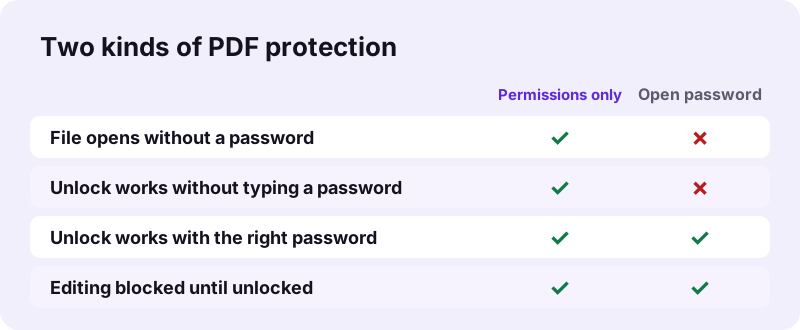
To edit a secured PDF, first remove its protection with Unlock PDF, then open the unlocked copy in Edit PDF. A file that only restricts editing or printing unlocks without a password. A file that asks for a password when you open it unlocks only after you type that password.
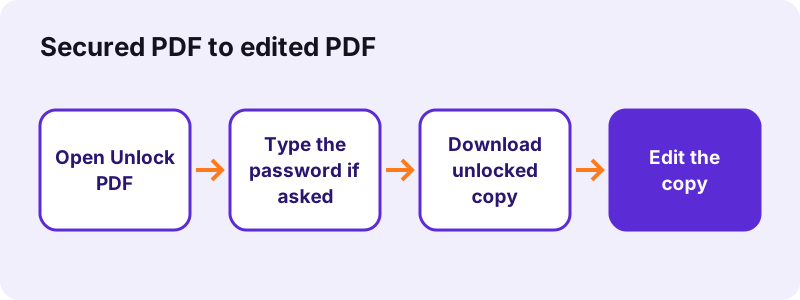
- Open Unlock PDF and choose the secured file.
- If the file needs a password to open, type it in the password box; otherwise leave the box empty.
- Press the unlock button and download the -unlocked.pdf copy.
- Open Edit PDF, choose the unlocked copy and make your changes.
- Lock the edited file again with Lock PDF if it must stay protected.
pdf24 edit secured PDF: what unlocking does
Unlocking runs qpdf, a PDF library compiled to WebAssembly, inside your browser. It decrypts the file and writes a copy without the encryption dictionary, so readers no longer apply the edit, copy or print limits. Pages, text and pictures stay unchanged: our 6-page test file kept all 6 pages and its text.
pdf24 edit secured PDF with an open password
If the PDF asks for a password before it opens, the content itself is encrypted with that password. Without it, the unlock step stops with a message asking you to type it. We do not guess, test lists of passwords or crack files; if you have lost the password, ask the person who sent the document.
pdf24 edit secured PDF: after the edit
The edited copy is unprotected. If the original was locked for a reason, protect it again with Lock PDF, which uses AES-256 and lets you block printing, copying or editing with a separate owner password that the tool shows once.
pdf24 edit secured PDF: tip for signed files
Some PDFs are restricted because they carry a certificate-based digital signature. Any edit after signing breaks that signature's integrity check, so send changes back to the signer instead of editing their copy.
Why does a reader block you when you pdf24 edit secured PDF files?
The message appears because the PDF author set permission flags when encrypting the file. Readers that respect the flags disable editing, commenting, copying or printing. Our pdf24 edit secured PDF test file opened normally but had these limits; after unlocking, the copy was no longer encrypted and every tool accepted it.
Our other tools refuse locked files too. When we added a password-protected file to Merge PDF or Compress PDF, both stopped with "This PDF is password-protected. Remove the password … first", which is the same signal: unlock first, then work on the copy.
What did our pdf24 edit secured PDF tests measure?
Our secured PDF tests used two copies of a 6-page text file. The permissions-only copy unlocked without a password in 0.4 seconds and became a 5.4 KB file that pypdf reported as not encrypted. The open-password copy stopped and asked for its password, exactly as it should without one.
| Test file | Password typed | Result | Time |
|---|---|---|---|
| locked-owner.pdf, 6 pages, 6.0 KB | none | Unlocked, 5.4 KB, 6 pages, not encrypted | 0.4 s |
| locked-user.pdf, 6 pages, 6.0 KB | none | Stopped: needs its password to open | 0.4 s |
| locked-user.pdf in Merge PDF | — | Refused: password-protected | 0.3 s |
| locked-user.pdf in Compress PDF | — | Refused: password-protected | 0.3 s |
Both runs sent no file anywhere: the request log showed only page and library downloads, and the result line reported 0 bytes uploaded. That is the same for every pdf24 edit secured PDF step, including the edit itself.
Is it legal to pdf24 edit secured PDF documents?
Editing a secured PDF is fine when the document is yours or you have permission, for example your own form that you locked, or a file whose sender gave you the password. Removing protection to change someone else's contract, certificate or copyrighted book without permission can break the law and the trust behind the document.
- Fine: your own locked file, a form you must fill in, a file whose password you were given.
- Ask first: documents from an employer, school, bank or court.
- Do not: alter signed agreements, official certificates or paid e-books you do not own the rights to.
“A digital signature is a mathematical scheme for verifying the authenticity of digital messages or documents.”
pdf24 edit secured PDF: which edits work after unlocking
Once the copy is unlocked, every tool on the site accepts it. Edit PDF adds text, images, drawings, highlights, white-out and shapes; it does not rewrite existing letters, so changing a word means white-out plus new text. Forms can be filled, pages rotated, removed or merged, and the result compressed.
| Goal after unlocking | Tool |
|---|---|
| Change a date or name | Edit PDF (white-out + text) |
| Fill in the fields | Fill out PDF |
| Remove words for good | Redact PDF |
| Add a visible signature | Sign PDF |
A practical order for the pdf24 edit secured PDF route is: unlock, make every change in one editing session, check the result, and only then protect it again. Each extra unlock and lock cycle adds a step where an unprotected copy is saved, so batching the edits keeps that window short.
pdf24 edit secured PDF on iPhone, Android and computers
Unlock and edit run in Safari, Chrome, Edge and Firefox on phones and computers, because both are web pages. On iPhone, pick the file in the Files app and find the unlocked copy in Downloads; on Android use Files or Downloads. The PDF is decrypted on the device, never on a server.
Type the password carefully on a phone keyboard: PDF passwords are case-sensitive, and a wrong one gives the same stop message as a missing one. For how the browser opens local files, see the File API on MDN.
On a phone, the pdf24 edit secured PDF steps take longer for large scans, because the page previews are drawn on the device. Text files like our 6-page test document open in the editor within a few seconds, so keep the screen on until the preview appears.
Is it safe to pdf24 edit secured PDF files in a browser?
Unlocking and editing here are private because the file and the password stay on your device. qpdf runs as WebAssembly in the tab, the password is never sent anywhere, and our request log showed no POST request. When you close the tab, the decrypted copy exists only where you saved it.
Delete the unlocked copy when you no longer need it, or protect it again, so an unprotected version of a sensitive file does not stay in your Downloads folder longer than necessary.
pdf24 edit secured PDF: frequently asked questions
Is pdf24 edit secured PDF free?
Yes. Unlocking and editing on pdf24tools cost nothing: no account, no watermark and no limit on files. The pdf24 edit secured PDF steps run inside your browser on your own device, so there is no server cost to charge for, and you can repeat them whenever a new restricted file arrives.
Can pdf24 edit secured PDF remove a password I do not know?
Only for permission limits. A file that opens normally but blocks editing or printing unlocks without any password. A file that asks for a password to open stays encrypted until you type the correct one; we do not crack or guess passwords. Ask the sender if you lost it.
Why does pdf24 edit secured PDF say the PDF is password-protected?
The file is encrypted, and the tool you used cannot read encrypted pages. Merge, Compress and the other tools show this message on purpose. Open Unlock PDF first, type the password if the file asks for one, download the unlocked copy and use that copy in the other tool.
Does pdf24 edit secured PDF change the content of my file?
Unlocking does not. qpdf only removes the encryption and the permission flags; pages, text, pictures and fonts are written back unchanged. In our test the 6-page file kept all 6 pages and its selectable text. Your edits come in the second step, in Edit PDF.
Can pdf24 edit secured PDF lock the file again after editing?
Yes, with Lock PDF. Set an opening password of at least 4 characters, or tick the limits you want for printing, copying and editing. With limits, the tool creates a separate random owner password and shows it once, so write it down if you may need to lift the limits later.
Is my password sent anywhere by pdf24 edit secured PDF?
No. The password is typed into a field on the page and handed to qpdf running as WebAssembly in your browser. Neither the password nor the file is uploaded; the result line reports 0 bytes uploaded, and our request log showed no POST request during the test.
Does pdf24 edit secured PDF work on a digitally signed file?
It can unlock and edit the copy, but the edit breaks the certificate signature: a viewer will show that the document changed after signing. For signed contracts, ask the signer to correct and sign again instead of editing your copy. A visible signature image is not affected this way.
How long does pdf24 edit secured PDF take?
Unlocking is fast: our 6-page test file took 0.4 seconds on a Windows laptop in Chrome, and a phone needs a little longer. Editing time depends on how many changes you make. Large scanned files take longer to load in the editor than small text documents.
Can pdf24 edit secured PDF edit the text directly?
Not the existing letters. Edit PDF adds new objects on the page: text, images, drawings, highlights, white-out and shapes. To change a word, cover it with white-out and type the replacement. White-out does not delete the hidden word, so use Redact PDF when a word must disappear completely.
Does pdf24 edit secured PDF work on iPhone?
Yes. Open Unlock PDF in Safari, tap the button to choose the file in the Files app, type the password if the file asks for one, and save the unlocked copy. Then open Edit PDF, choose that copy and make the changes with your finger.
Why is my file still restricted after pdf24 edit secured PDF?
Check that you opened the new -unlocked.pdf copy, not the original, which stays unchanged on your device. If the reader still shows limits, the file may carry a certificate signature with its own locks, or the reader may be showing a cached copy. Close and reopen the unlocked file, or ask the author for an editable version.
Is pdf24 edit secured PDF an official tool?
No. pdf24tools is an independent website and is not affiliated with PDF24 or Geek Software GmbH. Unlock and Edit here are separate tools that run in your browser. The results in this guide are our own measurements from 2 November 2026.
Can pdf24 edit secured PDF unlock several files at once?
Unlock PDF takes one file per run, so each file can get its own password. Running it again for the next file takes a few seconds. After unlocking, Merge PDF can join the copies into one document, which you can then edit or lock in a single step.
More pdf24 edit secured PDF tools and guides
pdf24 edit secured PDF: sources
- Digital signature — Wikipedia
- WebAssembly — Wikipedia
- File API — MDN Web Docs