How to use pdf24 photo to PDF under 90 KB in 4 steps
- Choose the pictures. Tap Choose images and select one or more files. They become pages in the order shown; arrows reorder them.
- Check the options. A4 with a small margin is the default, and 90 KB is already set as the maximum size.
- Press Convert to PDF. When the first PDF is too big, pictures are scaled down and re-encoded as JPEG until the file fits.
- Download and check. The result line shows the final size next to the 90 KB limit. Zoom in to check small print.
How many photos fit in 90 KB with pdf24 photo to PDF under 90 KB?
A phone photo is often 3 to 4 MB, so each picture must lose pixels and JPEG quality to fit 90 KB. In our tests a document photo stayed readable at about 25 to 40 KB, which means 90 KB holds around 2 readable pictures. Plain text documents shrink better than busy photos.
| Pictures | Budget per picture | Readability |
|---|---|---|
| 1 | 90 KB | Readable |
| 2 | 45 KB | Readable |
| 3 | 30 KB | Tight, small print may blur |
| 5 | 18 KB | Too small to read |
| 10 | 9 KB | Too small to read |
pdf24 photo to PDF under 90 KB for ID cards and certificates
One card or certificate per page reads well even at small sizes. Photograph it flat, in daylight, filling the frame.
pdf24 photo to PDF under 90 KB for multi-page documents
Shoot each page straight on and keep the order; the arrows in the file list fix the order before converting.
pdf24 photo to PDF under 90 KB on iPhone
HEIC photos from an iPhone are accepted and converted on the device, so you do not need to change the camera format first.
pdf24 photo to PDF under 90 KB: a tip for dark photos
Noise from dark photos takes space after compression. Shoot in good light and the same 90 KB limit keeps more detail.
What did pdf24 photo to PDF under 90 KB reach in our tests?
Conversion to a PDF under 90 KB was measured on 2026-10-17 with 12-megapixel phone photos: one photo of 3,687 KB became a 42 KB PDF at a 50 KB limit, and three photos of 11,062 KB fitted 124 KB at a 200 KB limit. Results depend on how busy the picture is.
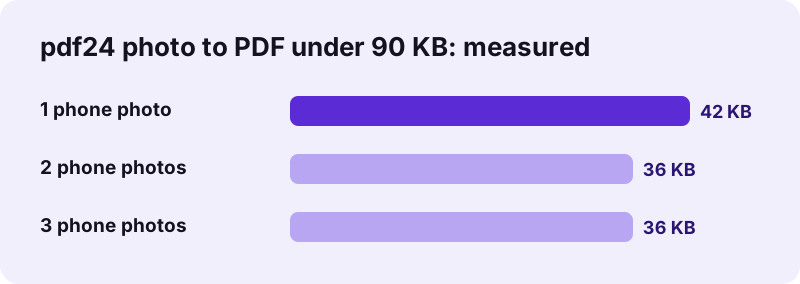
| Pictures | Original | Limit | Result |
|---|---|---|---|
| 1 phone photo | 3,687 KB | 50 KB | 42 KB |
| 1 phone photo | 3,687 KB | 100 KB | 42 KB |
| 1 phone photo | 3,687 KB | 200 KB | 110 KB |
| 2 phone photos | 7,375 KB | 50 KB | 36 KB |
| 2 phone photos | 7,375 KB | 100 KB | 83 KB |
| 2 phone photos | 7,375 KB | 200 KB | 83 KB |
| 3 phone photos | 11,062 KB | 50 KB | 36 KB |
| 3 phone photos | 11,062 KB | 100 KB | 54 KB |
| 3 phone photos | 11,062 KB | 200 KB | 124 KB |
“JPEG is a commonly used method of lossy compression for digital images, particularly for those images produced by digital photography.”
Which formats does pdf24 photo to PDF under 90 KB accept?
Conversion to a PDF under 90 KB accepts JPG, JPEG, PNG, WebP, GIF, BMP, HEIC, TIFF and SVG pictures. PNG transparency turns white, a multi-page TIFF adds every page, and every picture is re-encoded as JPEG when that is needed to stay within the 90 KB limit.
- Phone photos are large JPG or HEIC files of 3 to 4 MB; the tool scales them down to small pages.
- Any picture your browser can open works, plus HEIC and TIFF, which the page decodes itself.
- Need another limit? See all image to PDF limits.
pdf24 photo to PDF under 90 KB works in Chrome, Edge, Firefox and Safari on Windows, macOS, Linux, Android and iOS.
pdf24 photo to PDF under 90 KB: frequently asked questions
Is pdf24 photo to PDF under 90 KB free?
Yes. Converting photos to a PDF under 90 KB costs nothing here, with no account, no watermark and no limit on the number of files. The work runs in your browser, so there is no upload queue and no waiting list either, even with dozens of photos.
Will pdf24 photo to PDF under 90 KB lower the quality?
Only as much as the 90 KB limit needs. The tool starts with mild settings and stops at the first step that fits, so a generous limit keeps nearly all of the detail and a strict one trades resolution for size. The final size is always shown before you save.
Can pdf24 photo to PDF under 90 KB put several pictures in one file?
Yes. Add as many pictures as you like; each one becomes a page in the order shown, and the arrows change the order. The 90 KB limit applies to the whole PDF, so more pictures means less room for each one, and very strict limits suit one or two pictures.
Does pdf24 photo to PDF under 90 KB upload my pictures?
No. The pictures are read and converted on your own device by the browser, and the result line reports 0 bytes uploaded. Nothing is stored, so there is nothing to delete when you close the tab. The same is true on phones, tablets and computers.
More pdf24 photo to PDF under 90 KB tools and guides
pdf24 photo to PDF under 90 KB: sources
- File API (MDN Web Docs) — MDN
- PDF format family (Library of Congress) — Library of Congress
- JPEG (Wikipedia) — Wikipedia